dexter-by-schlage-electronic-security-set-user-guide_JDE265
Open the original PDF document
View PDFUSER GUIDE GUIA DEL USUARIO
OVERVIEW OF THE LOCKSET
DESCRIPCIÓN GENERAL DEL JUEGO DE CERRADURA
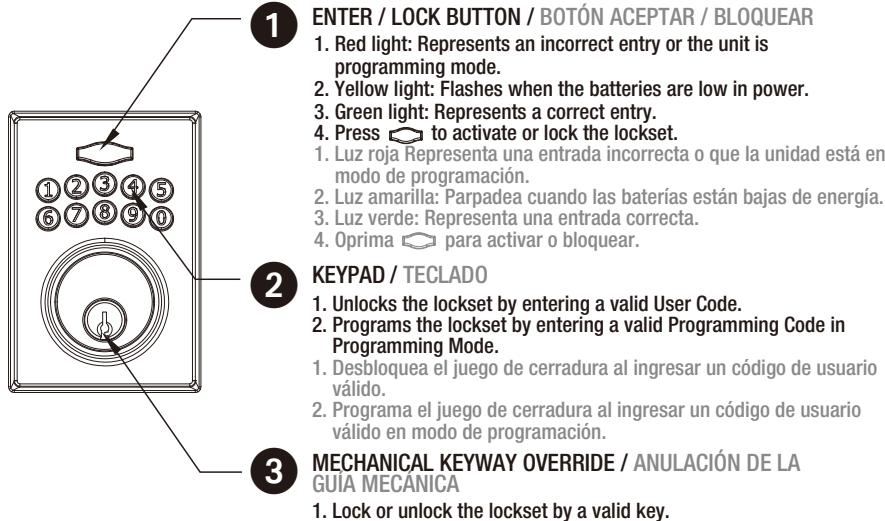
BATTERY COVER / CUBIERTA DE LA BATERÍA 1. Protects the batteries from unexpected damage. 1. Protege las baterías de daños imprevistos. [SET] BUTTON / [CONFIGURACIÓN] BOTÓN 1. Press set button for 1 second to enter programming mode. 2. Please refer to 2 - 2 for more information about programming mode. 1. Presione el botón durante 1 segundo para introducir el código de programación. 2. Consulte 2 - 2 para más información sobre el modo de programación INTERIOR THUMBTURN / CERROJO INTERIOR Locks or unlocks the lockset manually.
1. Bloquear o desbloquear el juego de cerradura con una clave válida.
HOW TO LOCK / UNLOCK / PROGRAM THE LOCKSET CÓMO BLOQUEAR, DESBLOQUEAR Y PROGRAMAR EL JUEGO DE CERRADURA
HOW TO LOCK / LINLOCK THE LOCKSET
CÓMO BLOQUEAR Y DESBLOQUEAR EL JUEGO DE CERRADURA
Para bloquear
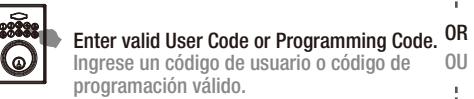
El teclado está temporalmente desactivado después durante 1 minuto de 4 entradas consecutivas incorrectas
Keypad is temporarily disabled for 1 minute after 4 consecutive incorrect entries.
Ingrese un código de usuario o código de 0U
NOTICE / AVISO
de cerradura.

1. Se usa para bloquear o desbloquear manualmente el juego
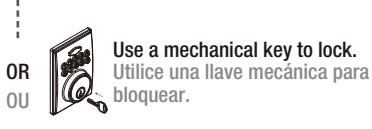
Use a mechanical key to lock. Utilice una llave mecánica para o bloquear.
HOW TO PROGRAM THE LOCKSET COMO PROGRAMAR LA CERRADURA
BASIC SETTINGS CONFIGURACIÓN BÁSICA
To lock
Change Programming Code Cambie el código de programación
WARNING / ¡ADVERTENCIA! Failure to change default Programming Code is an unsafe practice and may lead to injury.
edeterminado es una práctica insegur que puede llevar a una lesión.
· El código de programación por defecto es "123456".
The default Programming Code is "123456".
desbloguear la cerradura.
El código de programación se puede utilizar para programar o
Programming Code can be used to program or unlock the lockset. Press [SET] for 1 second.
Presione [SET] durante 1 segundo.
Programming Code (6 digits) Código de programación (6 dígitos)
+ \( \) + \( \) + \( \) + \( \) + \( \)
New Programming Code(6 digits) Nuevo código de programación (6 digitos)
Add a User Code(S)
· User Code can be used to unlock the lockset. • User Code cappcity: 10 sets (4-6 digits). El código de usuario se puede utilizar para desbloquear la cerradura. Capacidad de código de usuario: 10 configuraciones (4-6 dígitos).
1 second. Presione [SET] durante 1 segundo
Press [SET] for
Programming Code (6 digits) Código de programación (6 dígitos)
+ - + 2 + 0 + - +
(4-6 digits) Información de usuario nuevo (4-6 dígitos)
Add another code
Delete individual User / Single-entry Code(s) Elimine el/los código/s de entrada única / usuario
· Delete individual User Code(s). · Eliminar códigos de usuario individuales
Press [SET] for Programming Code 1 second. Presione [SET] durante 1 segundo.
(6 digits) (6 dígitos)
Código de programación
User Code / Single-entry Code (4-6 digits)
Código de usuario Código entrada única (4 a 6 dígitos)
Delete another code
Delete all User / Single-entry Codes Elimine todos los códigos de entrada única / usuario
· Delete all User & Single-entry Codes. Elimine todos los códigos de entrada única y usuario
Press [SET] for 1 second. Presione [SET] durante 1 segundo.
Programming Code (6 dígitos)
(6 digits) Código de programación
ADVANCED SETTINGS CONFIGURACIÓN AVANZADA
Add Single-entry Code(s)
Single-use User Code can only be used once to unlock the lockset. Single-use User Code capacity: 5 sets (4 digits). El código de usuario de uso único sólo se puede utilizar una vez
para desbloquear la cerradura. · Capacidad de código de usuario de uso único: 5 configuraciones (4 dígitos).
El modo de vacaciones deshab ilita temporalmente TODOS los
Press [SET] for 1 second. Presione [SET] durante 1 segundo.
Programming Code (6 dígitos)
(6 digits) Código de programación (2) + (2) + (1) + (2) + (1)
(4 digits) Code à entrée unique(4 chiffres)
Single-entry Code
Add another code Añadir otro código
Vacation Mode Modo de vacaciones
códigos de usuario.
Vaction mode temporarily disable ALL User Codes.
Press [SET] for 1 second. Presione [SET] durante 1 segundo.
Press [SET] for
1 second.
Presione [SET]
durante 1 segundo
Press [SET] for
1 second.
Presione [SET]
durante 1 segundo.
Programming Code (6 digits) (6 dígitos)
Turn On 1 Encender
Turn Off
Apagar
Turn On
Volume Control Control de volumen
Turn on / off door lock operation volume. · Volume is always on in the programming mode.
· Encender/apagar el volumen de operación de bloqueo de la puerta.
· El volumen siempre está encendido en el modo de programación.
Programming Code (6 digits)
Programming Code
(6 digits)
(6 dígitos)
Código de programación
(6 digits) Código de programación (8) + (8) + (0) + (3) + (4)
Encender Turn Off Apagar
0
Auto-lock
· Auto-lock is disabled by default.
· El autobloqueo está deshabilitado por defecto.
Auto-lock Delay Timer range: 10 -99 seconds. Temporizador de retardo de autobloqueo por defecto: 10 segundos.
Press [SET] for 1 second. Presione [SET] durante 1 segundo
Programming Code (6 dígitos)
Código de programación + + + + + + + + + + + + + + + + + + +
Turn On Encender Turn Off 0 Apagar
Auto-lock Delay Timer
Temporizador de retardo de autobloqueo
· Default Auto-lock Delay Timer: 10 seconds.
· Rango de temporizador de retardo de autobloqueo 10-99 segundos.
The lockset will exit the programming mode and resume to the stand-by status if no input is made in 10 seconds. · 3 Beeps means something was entered incorrectly. Please redo the step again.
ción y reanudará el modo de espera si no se oprime ningún botón durante 10 segundos. 3 bips significan que se ha introducido algo incorrectamente. Vuelve a hacer el paso de nuevo.
NOTICE / AVISO
Enter New Amount (10 - 99) Ingresar nuevacantidad

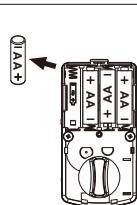
Remove one battery Retire una batería
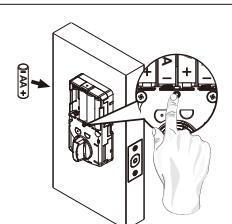
Press and hold SET button while inserting the battery back. Hold the set button until long beep over. Mantenga pulsado el botón SET mientras inserta la bateria. Mantenga pulsado el botón de ajuste hasta que se detenga el pitido largo.
- This will erase all stored information, including bolt direction Please re-enter the default Programming Code to set up the lock after restoring to factory settings. Esto borrará toda la información almacenada, incluyendo dirección del perno. Vuelva a introducir el código de programación por defecto para configurar el bloqueo después de restaurar la configuración de fábrica.
3 TROUBLESHOOTING
RESOLUCIÓN DE PROBLEMAS

INSTALLATION
INSTALACIÓN
|
QUESTIONS
PREGUNTAS |
ANSWERS
RESPUESTA |
|
|---|---|---|
| A.The latch does not operate correctly after installation. A. El juego de cerradura no opera correctamente después de la instalación. |
|
|
| B. Feel a bump while turning the thumbturn or the key? B. Siente un golpe al girar el cerrojo o la llave? | Please execute lock & unlock function to allow the motor to reposition itself again. The battery is low if the battery indicator light keeps flashing. Please replace with four new batteries. Please restore to factory setting and enter the default Programming Code to set up the lock. Ejecute la función de bloqueo y desbloqueo para permitir que motor se reposicione. Si el indicador de batería baja sigue parpadeando, las baterías se están agotando. Instale cuatro baterías nuevas. Restaure la configuración de fábrica e introduzca el código de programación por defecto para configurar el bloqueo. | |
| C. Fail to set up the lock. C. Error de configuración de bloqueo. | Please make sure the lock is installed correctly. Please install the fresh batteries and make sure the cable is connected correctly. Asegúrese de que el bloqueo se ha instalado correctamente. Instale las baterías nuevas y asegúrese de que el cable está conectado correctamente. | |
OPERATION
not function.
G. La función "Bloqueo
automático" no funciona.
| OPERACIÓN | ||
|---|---|---|
|
QUESTIONS
PREGUNTAS |
ANSWERS
RESPUESTA |
|
| A. Battery indicator keeps flashing. A. El indicador de la batería sigue parpadeando. | CAUTION / PRECAUCIÓN 1. The batteries are getting low, please replace with four new batteries for the best performs (alkaline batteries only ). 1. Las baterías pueden tener la potencia baja; reemplace con cuatro baterías nuevas para un mejor rendimiento. (baterías alcalinas solamente) | |
|
B. Keypad not
responding. B. El teclado no responde. |
Make sure the batteries are installed properly. The batteries are getting low if the battery indicator keeps flashing. please replace with four new batteries for the best performance (alkaline batteries only ). Make sure the cable is well-connected to the port, and was not damaged during installation. Please make sure the lock has been set up and complete the bolt direction determination. Revise la instalación de la batería. Si el indicador de batería baja sigue parpadeando, las baterías se están agotando; instale cuatr baterías nuevas para obtener un mejor desempeño (únicamente baterías alcalinas). Asegúrese de que el cable está bien conectado al puerto y que no se dañó durante la instalació 4. Asegúrese de que el bloqueo se ha configurado y se ha completado la determinación de la dirección del perno. | |
|
C. Programming Code
can not be changed. C. No se puede cambiar el código de programación. |
Please refer to 2 - 3 in the user guide to restore factory setting and reprogram all codes. Consulte 2 - 3 en las instrucciones de instalación para restablecer el ajuste de fábrica y volver a programar todos los códigos. | |
|
D. What should I do if
wrong code was entered? D. Qué debo hacer si se ingresó un código erróneo? |
Press button once and continue to input code according to regular procedures. Oprima el botón una vez e ingrese el código de acuerdo con los procedimientos normales. | |
|
E. Can not delete all
User Codes . E. No puedo borrar todos los códigos de usuario. |
Make sure the whole code entering process is completed within 10 seconds, otherwise the unit will time out. Make sure the Programming Code has been entered correctly. Asegúrese de que se completo todo el proceso de entrada de códigos en 10 segundos, de lo contrario, se agotará el tiempo de espera de la unidad. Asegúrese de que se ha ingresado el código de programación correctamente. | |
|
F. Can not add a new
User Code. F. No puedo agregar un nuevo código de usuario. |
Make sure the whole code entering process is completed within 10 seconds, otherwise the unit will time out. Make sure the Programming Code has been entered correctly. The new User Code will not be accepted when the capacity is full. Try to delete any or some existing User Codes and then add new one(s) again. A User Code must be at least 4 to 6 digits. Asegúrese de que se completo todo el proceso de entrada de códigos en 10 segundos, de lo contrario, se agotará el tiempo de espera de la unidad. Asegúrese de que se ha ingresado el código de programación correctamente. El nuevo código de usuario no será aceptado cuando se completa la capacidad. Intente borrar alguno de los códigos de usuario existentes y agregue uno nuevo. Un código de usuario debe tener entre 4 y 6 dígitos como mínimo. | |
| G. "Auto lock" does | The batteries are low on power if the battery indicator keeps flashing. Please replace with four new batteries for the best performance (Alkaline Batteries Only) | |
with four new batteries for the best performance. (Alkaline Batteries Only).
1. Las baterías tienen la potencia baja si el indicador de la batería deja de parpadear. Por favor,
reemplace con cuatro nuevas baterías para un mejor rendimiento. (Sólo baterías alcalinas)
2. Please refer to 2 on the guide to enable the Auto-Lock function.
2.Consulte 2-2 en la guía para activar la función de bloqueo automático.
|
QUESTIONS
QUESTIONS |
ANSWERS
RÉPONSES |
|
|---|---|---|
| H. Lockset is not able to unlock / lock by keypad. H. El sistema de restricción de acceso no se puede desbloquear / bloquear mediante el teclado. |
|
|
| Lockset is unable to reset. El juego de cerradura no se restablece. |
|
|
| J. How to operate the lockset in darkness? J. Cómo operar el juego de cerradura en la oscuridad? | Press any button to activate the lockset back light. Oprima cualquier botón para activar la retroiluminación del juego de cerradura. | |
| K. The red indicator is still on after setting is completed. K. El indicador rojo sigue encendido después de completar la configuración. | 1. Check if [SET] button is jammed. 2. Re-install the batteries. 1. Revise si el botón [SET] está atascado. 2. Vuelva a instalar las baterías. | |
| L. The lockset locks when I enter my code and unlocks when I press the L. El juego de cerradura se bloquea cuando ingreso mi código y se desbloquea cuando toco la |
|
|
|
M. I cannot remove my
key unless it is in the locked position. M. No puedo retirar mi llave a menos que esté en la posición de bloqueo. |
Un-install the interior and exterior assemblies. Before re-installation, please follow these guidelines: Nake sure the bolt is in the retracted position. Do not have any key in lock cylinder. Nake sure the torque blade is inserted horizontally. Desinstale los ensambles interior y exterior. Antes de volver a instalarlos, siga estas indicaciones: Nasegúrese de que el perno esté en la posición retraída. Verifique que no haya una llave en el cilindro del cerrojo. Asegúrese de que la cuchilla de par esté colocada en posición horizontal. damaged or does not operate properly, please contact customer service for further assistance. | |
Si la cerradura parece estar dañada o no opera correctamente, comuníquese con su proveedor local para obtener más ayuda.

Access code list
Lista de códigos de acceso
After changing your Programming Code, do not pass your Programming Code to anyone else. Después de cambiar su código de programación, no dé el código de programación a cualquier otra persona.
| Programming Code / Nuevo código de programación | |
|---|---|
| Name / Nombre | User Code / Código de usuario |
WARNING / ¡ADVERTENCIA!
Warnings indicate potentially hazardous conditions, which if not avoided or corrected, may cause death or serious injury. Las advertencias indican condiciones peligrosas que si no se evitan o corrigen, pueden causar lesiones graves o la muerte.
⚠ CAUTION / PRECAUCIÓN ⚠
Cautions indicate potentially hazardous conditions, which if not avoided or corrected, may cause minor or moderate injury. Cautions may also warn against
Las precauciones indican condiciones potencialmente peligrosas que si no se evitan o corrigen, pueden causar lesiones leves o moderadas. Las precauciones también pueden advertir prácticas inseguras.
NOTICE / AVISO
Notice indicates a condition that may cause equipment or property damage. Se indica una condición que puede causar daños al equipo o a la propiedad.
For Limited warranty details.call Customer Service.
Para información y limitaciones específicas de la garantía, llamando Servicio de Asistencia al Cliente
Customer Service / Servicio de Asistencia al Cliente
1-877-671-7011 www.schlage.com 1-877-671-7011 www.schlage.com