PDQ Smart Ethernet Bridge ZBRG Quick Start Guide
Open the original PDF document
View PDF

QUICK START GUIDE
ZBRG ETHERNET BRIDGE
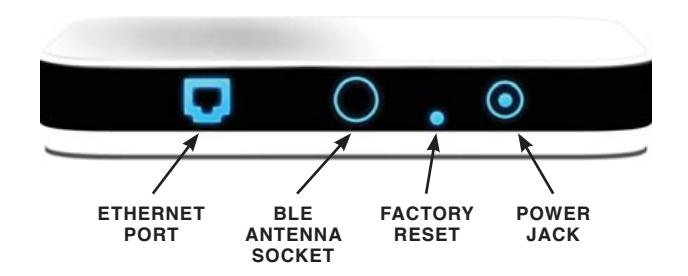
1 PLUG IN & POWER UP
PACKAGE CONTENTS
- 1: pdqSMART Ethernet Bridge
- 2: Ethernet Cable (1 Meter long)
- 3: BLE Antenna
- 4: Power Supply 5V@1A
- 5: Quick Start Guide
Paste your Product Label here
PRODUCT LABEL
SETUP ZBRG ETHERNET
- 1: Active pdqSMART Server Account https://portal.stp-pdqsmart.com
- 2: Install pdqSMART-STP App on Smartphone

3: Add at least 1 PDQ Smart Lock to account
Paste your QR here
QR CODE

QUICK START GUIDE
ZBRG ETHERNET BRIDGE
REGISTER PDQ SMART ETHERNET BRIDGE TO PDQ SERVER 2
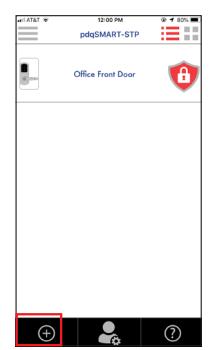
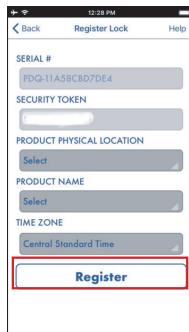

Launch pdqSMART-STP App on Smartphone. Tap Circle Plus


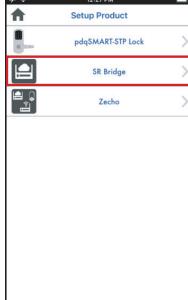
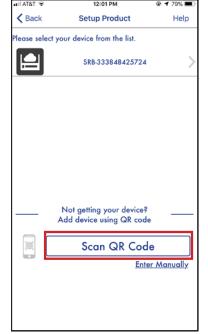
Tap SR Bridge Tap SCAN QR CODE and scan code.
*QR code is located under the device and front of this guide

Enter user-friendly device name and device location. Tap Register
LED INDICATIONS:
| EVENT | RED | WHITE | BLUE |
|---|---|---|---|
| Power On | Blink for 3 times | Blink for 3 times | Blink for 3 times |
| Bluetooth Connection | — | — | Blinking |
|
Connected with
PDQ Smart Server |
OFF | OFF | OFF |
|
Remote operation
request is in process |
— | Blinking | — |
| Remote operation completed | — | Solid for 3 Sec | — |
| Ethernet Cable is unplugged | Solid | — | Solid |
| IP Address is not assigned | — | — | Solid |
|
Bridge is not registered
with PDQ Smart Server |
Blinking | — | Solid |
|
Cannot communicate
with PDQ Smart Server |
Blinking | — | — |

pdqSMART tech support: 866-874-3662 or smartsupport@pdqlocks.com For more information about PDQ: 800.441.9692