LockeyUSA E915 Programming Electronic Lock Instructions Updated
Open the original PDF document
View PDFELECTRONIC DEADBOLT
User Guide
Do not use any chemical liquid or lubricating oil with additives to clean the lock body. It will damage the surface or even mainboard.
Operational Interface
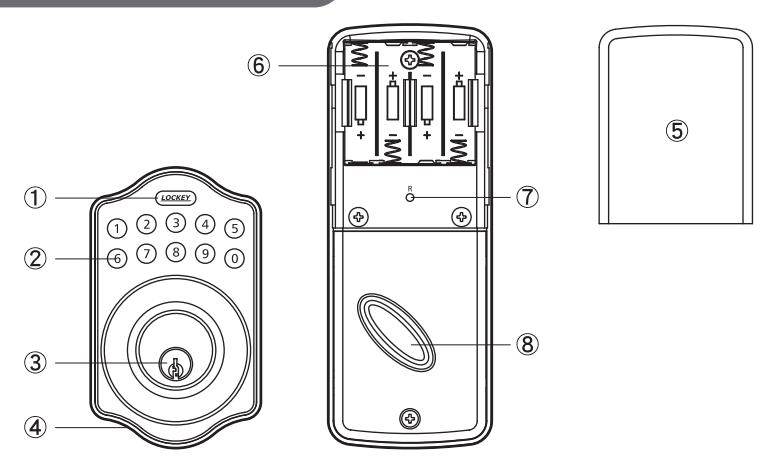
1 Programming Button
Programming button is for entering codes, clearing errors and setting function. It is also used to lock the door.
2 Number Buttons
To enter user codes. Each user code is 4–10 digits in length.
3 Cylinder
To lock/unlock the lockset from outside.
4 Washer
Prevents water from permeating into lockset.
⑤ Battery Lid
Slide the lid to change the batteries.
6 Battery Holder
Four AA (1.5 V) alkaline batteries.
7 R Button (Reset)
Restore default settings
8 Turn-piece
To lock/unlock the lockset from inside.
Operating Instructions
Keep the door open while programming to avoid being locked out accidentally.
The lock contains one factory-preset user code but can be programmed to store up to a total of six additional unique use codes.
Codes can be added and deleted at any time.
For first-time programming, use factory default programming code. It's recommended to change the default programming code and default user code right after your install the lock.
Unlocking the lockset
From the exterior, the lockset can be unlocked using the key or by entering the User Code followed by the Lockey button on the keypad. From the interior, unlock by turning the thumbpiece.
Locking the lockset
From the exterior, the lockset can be locked using the key or by pressing the Lockey button on the keypad. From the interior, lock the lockset by furning the thumbniece
Operation Indicator Sounds and Lights
| - por an on mandator of an an and - 19.110 | |||
|---|---|---|---|
| Sounds | Lights | Meaning | |
| 1 Beep | Flashes Green Once | Successful Operation | |
| 2 Long Beeps | Flashes Green Twice | Successful Programming | |
| 3 Beeps | Flashes Red 3 Times | Operation Error | |
| 5 Beeps | Flashes Red 5 Times |
Code Input Error; System Shuts
Down for 45 seconds |
|
| 10 Rapid Beeps | Flashes Red 10 Times Low Battery Power | ||
| 3 Long Beeps | Flashes Orange 3 Times | Default Setting Restored | |
| Flashes Orange Slowly | In Programming Mode | ||
Default programming code (PC): 0000
Default user code (UC): 1234
Your new programming code (PC)
Your new user code (UC)
The same programming code and user code cannot be accepted.
The lock will cease operation if unauthorized codes are entered over 5 times. The system will unfreeze after 45 seconds.
Door Handing Identification Process
The lock needs to learn if your door is a right-handed or left-handed.


DO THIS FIRST
Add New User Code
Enter PC (LOCKEY) (1) (LOCKEY) (Enter New UC) (LOCKEY)
Note: Up to 6 sets of user codes can be saved. User codes should be 4-10 digits in length.
Delete an Existing User Code

Delete All User Codes at Once
Enter PC (LOCKEY) (3) (LOCKEY)
Note: Auto-locking and keypad locking functions will be invalid when user codes are deleted. The lock can only be operated by key during that time.
Change Programming Code

Toggle Auto-Lock On/Off

Note: The preset delay-time is 30 seconds, you can change the time by following instructions #7. Repeat the steps in #6 to cancel the auto-locking function.
Set Auto-Lock Time Delay

Note: 10-99 seconds delay-time available.
Toggle Mute On/Off

Note: Repeat same steps in #8 to turn beeper On/Off.
LED illumination is still functioning when it's in mute, but there will be no warning alarms.
Enable/Disable All User Codes

Note: Auto-locking and keypad locking functions will be invalid when user codes are disabled. The lock can only be operated by key during the time.
Repeat the steps to enable the user codes again.
Create a One-Time User Code 4-10 Digits Long

Note: The one-time user code will automatically cancel after it is used one time.
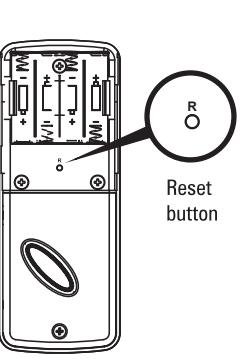
Restore Default Settings
Press R
Note: Press the button for more than 5 seconds; the programming is reset back to the original factory codes once you hear 3 long beeps.
After restoring default settings, you must run the door handing identifying process (#1) again before programming any other functions.
Trouble shooting
| PROBLEM | POSSIBLE CAUSE | CORRECTIVE ACTION |
|---|---|---|
| After installing the lockset and batteries, the door can't be locked and three short beeps are emitted when you press the Programming button. | The door-handing identification process isn't yet complete. | Refer to step1. |
| You've installed the lockset and batteries, but you still get no response when you press any button. | Batteries were installed incorrectly. | Check to see if the battery polarities have been reversed or if the battery is dead. If so, re-install or change the battery. If not, please check to see if the cable is properly connected. |
| When you are in the door-handing identifying process, you get the red light flashing three times, and three short beeps. | Wrong door-handing or change of the door-handing in the memory. | Press the R button to restore the system to factory default setting and re-execute door-handing identifying process (Refer to step 1) |
| Although you succeeded in the first execution of the door-handing identifying process, the latch still doesn't work. (i.e. You can feel the motor attempting to run, but the latch bolt is stuck, and the turnpiece can't be rotated.) | Low battery. | Replace with new alkaline batteries. |
| Although the electronic deadbolt has been functioning normally, the latch bolt suddenly locks up, and the turnpiece inside can't be rotated, not even with a key. | The deadbolt latch is stuck due to a warped door or misaligned door. | First, take out one battery, then press any button on the front panel for electric discharge, and put the battery back in. The latch bolt will automatically re-detect its position. Note: If the latch gets stuck frequently, please check and fix the alignment of the deadbolt latch & strike plate. |
| The door can be locked normally, but when you try to unlock it, you hear three short beeps and the lock won't unlock when you enter the user code and press the programming button. | The sensor did not sense position. | Unlock the door with the key and re-program the unit. If the problem persists, call our customer service department. |
| While the door is locked, you hear the latch bolt coming out when you press the Gatehouse to lock the door; however, three short beeps are emitted. Conversely, while the door is open, no beeps are emitted when locking the latch bolt. |
|
|
Warranty
The manufacturer warrants the product to be free from defects in material and workmanship for a period of 12 months from the original date of purchase. If you discover a defect in the product covered by this warranty, we will repair or replace the item at our option using new or refurbished components.
EXCLUSIONS
This warranty covers defects in manufacturing discovered while using the products as recommended by the manufacturer rather than occurred by the act of God, and damages caused by misuse, abuse, and unauthorized modification.
LIMITED LIABILITY
The manufacturer will not be held liable for incidental or consequential losses or damages from any act of God.