Eagle 4700 Programming Sheets for EGL4700(Steel Keypad)
Open the original PDF document
View PDF4. PROGRAMMING DATA AND INFORMATION
A. PROGRAMMING DATA AND INFORMATION The information in this section is sensitial for the proper completion of the Programming Sheet, Instructions Presented in the normal programming sequence encountered when entering the Designant Modes and as they appear on the Programming Sheet, by Biock Number. Note: The factory default program is given at the beginning of Section 3 BLOCK NO. 01: TELEPHONE NO. 1 Enter the telephone number of the primary central station receiver in Locations 1 through 16 using digits 0 through 3.0 to sure to include an area code or access number, if necessary. Enter of the telephone number of the clapsone number of the clapsone number of the Clapsone number of the Clapsone number. Be sure that all remaining locations are programmed "A" (Mank). The communication will alter many the Clapsone No. 1 and Telephone No. 2 (if programmed), making 8 attempts to each. BLOCK NO. 02: TELEPHONE NO. 2
making 8 attempts to each. BLOCK NO. 02. TELEPHONE NO. 2 Enter the telephone number of the secondary central station receiver in Leastions 1 through Louising digits of through 9. Be sure to include an area code or access number, if necessary Enter a "C" to provide 3-second dial delay. "B" denotes ""." An "A" will signify the end of the telephone number. Be sure that all remaining locations are programmed "A" (hings). If Sputt Reporting is programmed, all conditions will be reported to Telephone No. 1 except automatic if Telephone No. 2 is Backup Reporting is programmed, all conditions will report to Telephone No. 1 Security Backup Reporting is programmed, all conditions will report to Telephone No. 1 only.
BLOCK NO. 3: COMMUNICATOR OPTIONS Note: Consult central station for acceptable formats and message length. Location 1: Data Format.
- Location: I Data Format. Standard Format requires a 5-us 4-uligh account number tollowed by a single digit event code. Examples: "123" or "6548.2". Extended for Universal or Expanded Format transmits wor rounds of data. The first round contains the account number and an expanded character; the second repeats the expanded contains the account number and an expanded character; the second repeats the expanded contains the account number and an expanded character; the second repeats the expanded contains the prefore identifying zone code. Examples: "123" if the "333 1"; or "431 2.5" then "EEEB" prefore identifying zone code. Examples: "123" if then "333" 1"; or "431 2.5" then "EEEB" prefore identifying zone code. Examples: "123" if the "333" 1"; or "431 2.5" then "EEEB" prefore identifying zone code. Examples: "123" if the "333" 1"; or "431 2.5" then "EEEB" prefore identifying zone code. Examples: "123" if the "333" 1"; or "431 2.5" then "435" 1"; or "431 2.5" then "435" 1"; or "431 2.5" then "435" 1"; or "431 2.5" then "435" 1"; or "431 2.5" then "435" 1"; or "431 2.5" then "435" 1"; or "431 2.5" then "435" 1"; or "431 2.5" then "435" 1"; or "431 2.5" then "435" 1"; or "431 2.5" then "435" 1"; or "431 2.5" then "435" 1"; or "431 2.5" then "435" 1"; or "431 2.5" then "435" 1"; or "431 2.5" then "435" 1"; or "431 2.5" then "435" 1"; or "431 2.5" then "435" 1"; or "431 2.5" then "435" 1"; or "431 2.5" then "435" 1"; or "431 2.5" then "435" 1"; or "431 2.5" then "435" 1"; or "431 2.5" then "435" 1"; or "431 2.5" then "435" 1"; or "431 2.5" then "435" 1"; or "431 2.5" then "435" 1"; or "431 2.5" then "435" 1"; or "431 2.5" then "435" 1"; or "431 2.5" then "435" 1"; or "431 2.5" then "435" 1"; or "431 2.5" then "435" 1"; or "431 2.5" then "435" 1"; or "431 2.5" then "435" 1"; or "431 2.5" then "435" 1"; or "431 2.5" then "435" 1"; or "431 2.5" then "435" 1"; or "431 2.5" then "435" 1"; or "431 2.5" then "435" 1"; or "431 2.5" then "435" 1"; or "431 2.5" then "435" 1"; or "431 2.5" then "435" 1"; or "431 2.5" then "435
| DATA FORMAT | ENTER |
|---|---|
| Pulse Dialing; Standard Format or 4/2 | 0 |
| TouchTone® Dialing; Standard Format or 4/2 | 1 |
| Pulse Dialing; Extended Format | 2 |
| TouchTone Dialing; Extended Format | 3 |
| Pulse Dialing; Partial Extended Format | 4 |
| TouchTone Dialing; Partial Extended Format | 5 |
| No Communicator (Local Alarm) | 8 |
| . 9 |
Location 2: Receiver Format - Select the required receiver-format entry for Location 2 from the following table:
| ico Slow: FBI: Silent Knight Slow r; FBI; Silent Knight Fast |
0
1 2 3 |
|---|---|
| r; FBI; Silent Knight Fast |
1
2 3 |
| r; FBI; Silent Knight Fast | 3 |
| r; FBI; Silent Knight Fast | 3 |
| r; FBI; Silent Knight Fast | |
| 4 | |
| Radionice Slow (1400) | 5 |
| Franklin; Quickalert; Sescoa; Varitech | 6 |
| Radionics Slow (2300) | 7 |
| , | 8 |
| Α | |
| Radionics Fast (2300) | В |
|
Aedionice Slow (1400)
Franklin; Quickalert; Sescoa; Varitech Aedionics Slow (2300) Aedionics Fast (2000) required message-length entry for Loca |
| g taute. | ||
|---|---|---|
| MESSAGE LENGTH | ENTER | |
| 3/1 | 3-Digit Account Number; 1-Digit Event Code | 1 |
| 4/1 | 4-Digit Account Number; 1-Digit Event Code | 2 |
| 4/2 | 4-Digit Account Number; 2-Digit Event Code | 4 |
| c | Thomas and a company of the company of the company of the company of the company of the company of the company of the company of the company of the company of the company of the company of the company of the company of the company of the company of the company of the company of the company of the company of the company of the company of the company of the company of the company of the company of the company of the company of the company of the company of the company of the company of the company of the company of the company of the company of the company of the company of the company of the company of the company of the company of the company of the company of the company of the company of the company of the company of the company of the company of the company of the company of the company of the company of the company of the company of the company of the company of the company of the company of the company of the company of the company of the company of the company of the company of the company of the company of the company of the company of the company of the company of the company of the company of the company of the company of the company of the company of the company of the company of the company of the company of the company of the company of the company of the company of the company of the company of the company of the company of the company of the company of the company of the company of the company of the company of the company of the company of the company of the company of the company of the company of the company of the company of the company of the company of the company of the company of the company of the company of the company of the company of the company of the company of the company of the company of the company of the company of the company of the company of the company of the company of the company of the company of the company of the company of the company of the company of the company of the company of the company of the company of the company of the company of the company of the company |
- Age 4-Digit Account Number; 2-Digit Event Code 4 Note For Swiger Shutdown, and "8" to the selected entry. Location st-system Uptions. Sileat Pandinger Shutdown, and "8" to the selected entry. Sileat Pandinger Shutdown steep the selected entry. Sileat Pandinger Shutdown steep the selected entry. Sileat Pandinger Shutdown steep the selected entry selected by the selected entry of the selected entry selected with the transmitted to the central station of a panic code will activate the beilt. A panic alarm will be transmitted to the central station of a panic code will activate the beilt. A panic alarm will be transmitted to the central station of a panic code will activate the beilt. A panic alarm will be transmitted to the central station of a panic code will be transmitted to the central station of a panic code will be transmitted to the central station of a panic code will be transmitted to the central station of a panic code will report to Telephone No. 1. Openings and Closings will report to Telephone No. 0. 2-4-thour test. The communication will transmit the programmed code to the central station every 24 hours if no other report has been made. (I ransmission of any report will rest the internal 24-hour test timer.) 3-4-thour test timer.) 3-4-thour test timer.) 3-5-thour test timer.) Self test. The alarm bell will activate for 1 second each time the system is armed. System to Priorise. System to Priorise.
| SYSTEM OPTIONS | ENTE |
|---|---|
| Silent Panic | 0 |
| Audible Panic | 1 |
| Silent Panic; Split Reporting | ź |
| Audible Panic; Split Reporting | 3 |
| Silent Panic; 24-Hour Test | 4 |
| Audible Panic; 24-Hour Test | 5 |
| Silent Panic; Split Reporting; 24-Hour Test | ě. |
| Audible Panic; Split Reporting; 24-Hour Test | 7 |
| Silent Panic; Bell Test | 8 |
Audible Panic: Bell Test Silent Panic; Spit Reporting; Bell Test Audible Panic; Spit Reporting; Bell Test Silent Panic; Sul-Hour Test; Bell Test Silent Panic; Spit Reporting; Ed-Hour Test; Bell Test Audible Panic; Spit Reporting; Ed-Hour Test, Bell Test Audible Panic; Gpit Reporting; Ed-Hour Test, Bell Test
Audible Penies Gold Reporting, 84-Hour Test, Bell Test F BLOCK NO, 94-ACCOUNT NO. Finter s 2. to 4-digit subscriber assessus number for Telephone No. 1 in Locations 1 through 4. If a 3-digit number is used, program an "A" in Location 4. (Valid entries are 0-9 and B-F; "A" signifies the end of a number less than 4 digits, "A" signifies the end of a number less than 4 digits, BLOCK NO. 64 SACCOUNT NO. Enter a 3- to 4-digit subscriber account number for Telephone No. 2 in Locations 1 through 4. If a 3-digit number is used, program an "A" in Location 4. (Valid entries are 0-9 and B-F; "A" signifies the end of a number less than 4 digits,) Note Block No. 65 must be programmed if a second telephone number has been programmed be changed from its default value. BLOCK NO. 66 TIMPECHTS.
be changed from its default value. BLOCK NO, 6st TIMEOUTS Location 1: Entry Delay. Entry delay is programmable in 15- second increments. Valid entries are "1" (15 seconds) strough "F" (275 seconds). Location 1: Entry Delay. Entry delay is programmable in 15-second increments. Valid entries are "1" (15 seconds) strough "F" (275 seconds). Location 2: Eath Delay. Exit delay is programmable in 15-second increments. Valid entries are "1" (15 seconds) strough "F" (20 seconds). Location 3: Burglary Bell - Burglary bell timeout is programmable in 3-minute increments. Valid entries are "1" (2 minutes. "1" (2 minutes. "1" (2 minutes.) through "F" (on through "F" gives maximum timeout of 42 minutes. Location 4: Fire Bell - Fire bell timeout is programmable in 3-minute increments. Valid entries are "1" (3 minutes) through "F" (on timeout). "E" gives maximum timeout of 42 minutes. Location 4: Fire Bell - Fire bell timeout is programmable in 3-minute increments. Valid entries are "1" (3 minutes) through "F" (on timeout). "E" gives maximum timeout of 42 minutes. BLOCK NOS. 07 THROUGH 12: ZONE OPTIONS & ALARM CODES BLOCK NOS. 07 THROUGH 12: ZONE OPTIONS. & ALARM CODES BLOCK NOS. 07 THROUGH 12: ZONE OPTIONS. & ALARM CODES BLOCK NOS. 07 THROUGH 12: ZONE oPTIONS & ALARM CODES BLOCK NOS. 07 THROUGH 12: ZONE oPTIONS & ALARM CODES BLOCK NOS. 07 THROUGH 12: ZONE OPTIONS & ALARM CODES BLOCK NOS. 07 THROUGH 12: ZONE OPTIONS & ALARM CODES BLOCK NOS. 07 THROUGH 12: ZONE OPTIONS & ALARM CODES BLOCK NOS. 07 THROUGH 12: ZONE OPTIONS & ALARM CODES BLOCK NOS. 07 THROUGH 12: ZONE OPTIONS & ALARM CODES BLOCK NOS. 07 THROUGH 12: ZONE OPTIONS & ALARM CODES BLOCK NOS. 07 THROUGH 12: ZONE OPTIONS & ALARM CODES BLOCK NOS. 07 THROUGH 12: ZONE OPTIONS & ALARM CODES BLOCK NOS. 07 THROUGH 12: ZONE OPTIONS & ALARM CODES BLOCK NOS. 07 THROUGH 12: ZONE OPTIONS & ALARM CODES BLOCK NOS. 07 THROUGH 12: ZONE OPTIONS & ALARM CODES BLOCK NOS. 07 THROUGH 12: ZONE OPTIONS & ALARM CODES BLOCK NOS. 17 THROUGH 12: ZONE OPTIONS & ALARM CODES
- 3 and 4.) BURGLANY ZONES. The following types of Burglary Zones are selectables: Delayed -This is the EduCentry Zone, When the system is armed, exit delay begins. After exit delay begins. After exit delay are selectables: Delayed -This is the EduCentry Zone, When the system is armed, exit delay begins. After exit delay are selectable to the system is armed with Instant Protection, entry delay is cancelled and the EduCentry Zone will go into instant alarm when violated. Insterior -All interior zones are follower zones; that is, they have exit delay time upon arming and entry delay time only if a delayed zone (ExtrEntry) is violated first. However, if an automatically bypassed which is will cause an immediate alarm. All interior zones are automatically bypassed which is will cause an immediate alarm. All interior zones are delayed zone.
11
- Perimeter This is always an instant zone that will cause an immediate alarm if violated when armed. Burglany-Zone Options. The following Burglany-Zone options are available. Restore The programmed restore code will be transmitted after bell timeout (if the loop is restored) or if the system is disarmed during an alarm. Chime The keypad will sound a 1-second beep when the zone is violated while disarmed. Abort Delay Provides a 15-second delay before dialing, allowing the user to abort the transmission. It this teature is not selected, an unanorable transmission will be initiated immediately upon violation. In the property of the control of the property of the property of the control of the property of the property of the property of the property of the property of the property of the property of the property of the property of the property of the property of the property of the property of the property of the property of the property of the property of the property of the property of the property of the property of the property of the property of the property of the property of the property of the property of the property of the property of the property of the property of the property of the property of the property of the property of the property of the property of the property of the property of the property of the property of the property of the property of the property of the property of the property of the property of the property of the property of the property of the property of the property of the property of the property of the property of the property of the property of the property of the property of the property of the property of the property of the property of the property of the property of the property of the property of the property of the property of the property of the property of the property of the property of the property of the property of the property of the property of the property of the property of the property of the property of the property of the property of the property of
- Zone functions as a regular Burglary Zone. 24-HOUR ZONES. The following types of 24-HOUR Zones are selectable: Fire Use an end-of-line resistor instead of a power supervisory relay on the Fire Zone. Upon detection of the first fire violation, smoke-detector power will be reset for 8 seconds, after which power is restored. A Second reset period follows, allowing the smoke detectors rapid flashing Zone LED, and an immediate report to the central station. (Fire Zones cannot be bypassed and Fire-Zone transmissions cannot be aborted.) To silence the sounder and bell and reset smoke-detector power, enter any valid user code. If the Fire Zone is still violated within 2 minutes of power reset, the Zone LED will flash slowly to indicate a fire trouble. Smoke-detector power will be automatically reset every 4 lather than the contract of the property of the contract of the property of the property of the property of the property of the property of the property of the property of the property of the property of the property of the property of the property of the property of the property of the property of the property of the property of the property of the property of the property of the property of the property of the property of the property of the property of the property of the property of the property of the property of the property of the property of the property of the property of the property of the property of the property of the property of the property of the property of the property of the property of the property of the property of the property of the property of the property of the property of the property of the property of the property of the property of the property of the property of the property of the property of the property of the property of the property of the property of the property of the property of the property of the property of the property of the property of the property of the property of the property of the property of the property of the property of the property of the property of
- unbapassed if a widasion exist 4-Hoof Trouble This zone is always active, whether the system is armed or disarmed. 4-Hoof Trouble This zone is always active, whether the system is armed or disarmed. 4-Hoof Trouble This zone is always active, whether the system is armed sounder) or alkest trouble, with or without restore codes. Upon violation, the Zone Lton III flash the system of the system of the system of the system of the system of the system of the system of the system of the system of the system of the system of the system of the system of the system of the system of the system of the system of the system of the system of the system of the system of the system of the system of the system of the system of the system of the system of the system of the system of the system of the system of the system of the system of the system of the system of the system of the system of the system of the system of the system of the system of the system of the system of the system of the system of the system of the system of the system of the system of the system of the system of the system of the system of the system of the system of the system of the system of the system of the system of the system of the system of the system of the system of the system of the system of the system of the system of the system of the system of the system of the system of the system of the system of the system of the system of the system of the system of the system of the system of the system of the system of the system of the system of the system of the system of the system of the system of the system of the system of the system of the system of the system of the system of the system of the system of the system of the system of the system of the system of the system of the system of the system of the system of the system of the system of the system of the system of the system of the system of the system of the system of the system of the system of the system of the system of the system of the system of the system of the system of
ZONE OPTIONS. Program options for each zone. Select options from the following table and program corresponding entry in Locations 1 and 2.

| OPTIONS | ENTER |
|---|---|
| BURGLARY ZONES | |
| Perimeter | 10 |
| Perimeter; Restore | 11 |
| Perimeter; Day Zone | 12 |
| Perimeter; Day Zone; Restore | 13 |
| Perimeter; Chime | 14 |
| Perimeter; Chime; Restore | 15 |
| Perimeter; Abort Delay | 18 |
| Perimeter; Restore; Abort Delay | 19 |
| Perimeter; Day Zone; Abort Delay | 1A |
| Perimeter; Day Zone; Restore; Abort Delay | 1B |
| Perimeter; Chime; Abort Delay | 10 |
| Perimeter; Chime; Restore; Abort Delay | 1D |
| Delayed | 20 |
| Delayed; Restore | |
| Delayed: Chime |
21
24 |
| Delayed; Chime; Restore | |
| nterior | 25 |
| nterior; Restore |
40
41 |
| nterior; Chime | |
| nterior; Chimo; Restore | 44 |
| nterior; Abort Delay | 45 |
| nterior; Restore; Abort Delay | 48 |
| nterior; Chime; Abort Delay | 40 |
| nterior; Chime; Restore; Abort Delay | 4C |
| 4-HOUR ZONES | 4D |
| larm | |
| 4-Hour Trouble | 81 |
| ire | 82 |
| old-Up Alarm (no LED, sounder or bell) | 84 |
| ent Trouble (LED indication only) | 89 |
| larm: Restore | A8 |
| 4-Hour Trouble; Rectore | 91 |
| re; Restore | 92 |
| 94 | |
|
old-Up Alarm; Restore
lent Trouble; Restore |
99 |
| 9A | |
|
ARM CODES. Program an alarm code for each zone in Locations 3
OCK NO. 03: COMMUNICATOR OPTIONS, Data Format.) If a report is no ne, enter "A" in Locations 3 and 4 for that zone. |
0 P.06
1.
Standard Format. Enter the single-digit alarm code in Location 3. The entry in Location 4 will not be used: Example: For the desired transmission "12.25" (Account No. 125; Alarm Code Learned Code Learned Code Learned Code Learned Format. Enter the first slight of the alarm code in Location 3 and the second digit in Location 4. Example: For the desired transmission "123.3" then "333.4", enter a "3" in Location 3 and a "4" in Location 4.
3 and a "" in Location 4. Partial Extended Enter the desired right in Locations 3 and 4 to generate a single round airm. Partial Extended Enter the desired right in Locations 3 and 4 to generate a single round library. For the desired transmission "Alarm 123 3", "Restore 123 E", then "EEE 3", enter a "3" in both Location 3 and 4. 42. Enter the first digit of the airm code in Location 3 and the second digit in Location 4. Example: For the transmission "4765 32", enter a "3" in Location 3 and a "2" in Location 4.
DLOCK NO. D. AMMUSII, AC PALLUME (Refer to Zone ALABM COUSE, above, for data format programming information.) Leations 1 and 2. Ambus 4. Program the Ambush alarm code in Locations 1 and 2. Note that an Ambush transmission is not abortable. If Ambush will not be transmitted, enter "A,A" in Locations 1 and 2.
Locations 1 and 2: Ambush - Program the Ambush alarm code in Locations 1 and 2. Note that an Ambush transmission is not aborable. If Ambush will not be transmitted, enter "AA" in Locations 3 and 4: AC Failure - Program the AG Failure alarm code in Locations 3 and 4: AC Failure will not be transmitted, or the "AA" in Locations 3 and 4: AC Failure will not be transmitted, enter "AA" in Locations 3 and 4: AC Failure will not be transmitted, enter "AA" in Locations 1 and 1 AM FAILURE (Refer to Zone ALANG CORES for data format programming information.) Locations 1 and 3: Panks: JOUR MANTIENY (Refer to Zone ALANG CORES for data format programming information.) Locations 1 and 3: Panks: Program the Panks alease ended in Location 1 and 2. This alarm code will be transmitted for either Keypad Panks or Wired Panks: Panks transmissions are comediated and 4: Locations 3 and 4: Locations 3 and 4: Locations 3 and 4: Locations 3 and 4: Locations 3 and 4: Locations 4: Locations 4: Locations 4: Locations 4: Locations 4: Locations 4: Locations 4: Locations 4: Locations 5: Locations 6: Locations 6: Locations 6: Locations 6: Locations 6: Locations 6: Locations 6: Locations 6: Locations 6: Locations 6: Locations 6: Locations 6: Locations 6: Locations 6: Locations 6: Locations 6: Locations 6: Locations 6: Locations 6: Locations 6: Locations 6: Locations 6: Locations 6: Locations 6: Locations 6: Locations 6: Locations 6: Locations 6: Locations 6: Locations 6: Locations 6: Locations 6: Locations 6: Locations 6: Locations 6: Locations 6: Locations 6: Locations 6: Locations 6: Locations 6: Locations 6: Locations 6: Locations 6: Locations 6: Locations 6: Locations 6: Locations 6: Locations 6: Locations 6: Locations 6: Locations 6: Locations 6: Locations 6: Locations 6: Locations 6: Locations 6: Locations 6: Locations 6: Locations 6: Locations 6: Locations 6: Locations 6: Locations 6: Locations 6: Locations 6: Locations 6: Locations 6: Locations 6: Locations 6: Locations 6: Locations 6: Locations 6: Locations 6: Locations 6: Locations
BLOCK NO. 16: BYPASS; RESTORE; TROUBLE Lecation: I: Bypass Code - Program a single-digit Bypass Code in Location 1 to report a bypass on arming. If Bypass will not be transmitted, enter an "A" in Location 1. Note: If a two-digit data format has been programmed, the Bypass Code will be followed by the programmed second ugit of the Zones Code.
14
Location 2. Restore Code - Program a single digit. Restore Code in Location 2 to report Burglary Zones or 24-Hour Zones programmed for restore reports. If restore reports will not be transmitted, program an "A" in Location 2. Note: If a two-digit data format has been programmed, the Restore Code will be followed by the programmed second digit of the Zones Code.
Code. Location 3: Trouble Code - Program a single-digit Trouble Code in Location 3 to report Day-Lone troubles and any true troubles, whose I if a two-digit forman has been programmed, the Trouble Code will be followed by the second digit of the respective Zones Code. Location 4: Reserved - This location is reserved for possible future use. Program an "A" in Location 4.
Location 4. BLOCK NO. 17. KEYPAD PANIC Program the first Frame attarn code in Locations 1 and 2. If First Panic will not be transmitted, reagram the first Frame attarn code in Locations and 4. If First Panic will not be transmitted, there "AA," in Locations 1 and 2. Program the Autuiliary Panic aliann code in Locations 3 and 4. If Auxiliary Panic will not be transmitted, enter "AA," in Locations 3 and 4. Note: Both Fire and Auxiliary Panics are audible only. (Also see BLOCK NO. 14.) BLOCK NO. 00: DEALER PROGRAM CODE The default Dealer Program Code is 4,7,0.0. Program your own 4-digit code (digits 0.9) in Locations 1 through 4 to prevent unauthorized access to the Dealer Program Mode.
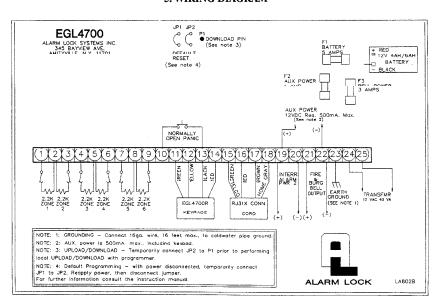
5. WIRING DIAGRAM
15