CV-WR Series Manual
Open the original PDF document
View PDF

CV-WRX4 Wiegand Receiver
INSTALLATION INSTRUCTIONS
THIS PACKAGE INCLUDES:
(1) CV-WRX4 Receiver
(2) #6 Wall Plugs
(2) #6 x 1-1/4" Screws
(1) Cable Plug
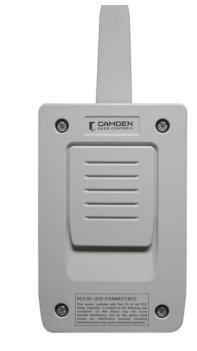
CV-WRX4 receiver is designed for use with Camden CV-WTX2 transmitters. The transmitter signal is codified in two different protocols according to its configuration: Wiegand 26 and Wiegand 37. The receiver provides facility codes 1 to 255 by DIP switch J9 using 8 bit binary configuration.
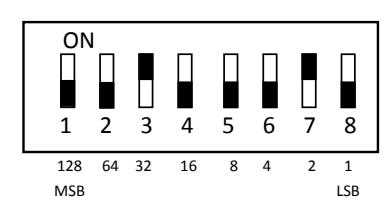
The DIP switch positions set the facility code.
For example: 34. SW#3 = 32. SW#7 = 2.
The total = 32 + 2 = 34
+
12V dc supply
CH1 Decoded signal output (D0 Wiegand) Decoded signal output (D1 Wiegand)
-
12V dc supply
CH2
Decoded signal output (D0 Wiegand) Decoded signal output (D1 Wiegand)
1. TECHNICAL CHARACTERISTICS
| Power Supply | 12V DC ( 9VDC - 21VDC) |
|---|---|
| Frequency | 868.35 MHz |
| Consumption Standby / Operating | 14mA / 36mA |
|
Operating
Temperature |
-4°F to +185°F (-20°C to +85°C) |
| IP Rating | IP54 (IP65 with cable plug installed) |
| Dimensions |
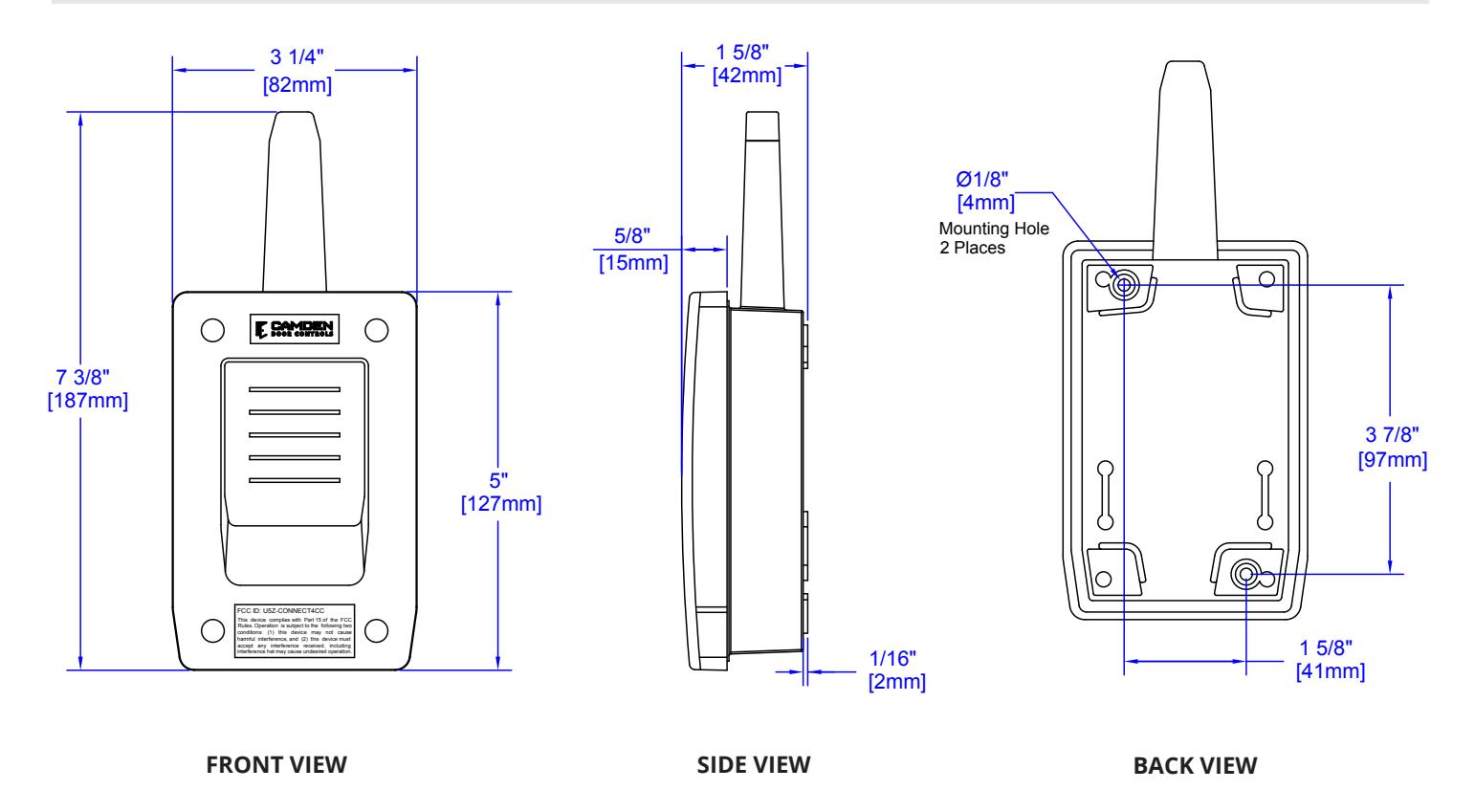
3 1/4" W x 7 3/8" H x 1 5/8" D
(82mm x 187mm x 42mm) |
3. OPERATING
Configuration and connection for the different protocols.
| Protocol |
Power
Supply |
Signal
Outlet |
SW1
Protocol |
Format |
|---|---|---|---|---|
|
Wiegand
26 |
+ - |
D0 and
D1 |
Off |
8 bits facility code + 16 bits
credential ID number |
|
Wiegand
37 |
+- |
D0 and
D1 |
ON | - |
Note : To use other protocols, contact Camden.
2. INSTALLATION AND CONNECTIONS
Attach the rear part of the enclosure to the wall using the plugs and screws supplied. Pass the cables through the grommet of the enclosure. Connect the power cables to the terminals marked on the mother board, as Indicated.
Mount the receiver cover and pass the cables and the antenna through it.
Operations
The green power on LED will illuminate when power is provided. The red signal LED will illuminate for the duration it receives the message from the transmitter.
If the red LED does not illuminate when the transmitter button is pressed, the receiver is not receiving the transmission signal from the transmitter. Reduce the distance to the receiver, and verify the transmitter is working as suggested
Refer to Facility Code DIP switch table to select the value of facility code to be sent from the receiver.
4. CONVERSION TABLE (DECIMAL TO BINARY)
* Facility Code: SW1-8, 0=OFF/1=ON
| DECIMAL | |||||||
|---|---|---|---|---|---|---|---|
| BINARY | DECIMAL | BINARY | DECIMAL | BINARY | DECIMAL | BINARY | |
| 0 | 00000000 | 16 | 00010000 | 32 | 00100000 | 48 | 00110000 |
| 1 | 00000001 | 17 | 00010001 | 33 | 00100001 | 49 | 00110001 |
| 2 | 00000010 | 18 | 00010010 | 34 | 00100010 | 50 | 00110010 |
| 3 | 00000011 | 19 | 00010011 | 35 | 00100011 | 51 | 00110011 |
| 4 | 00000100 | 20 | 00010100 | 36 | 00100100 | 52 | 00110100 |
| 5 | 00000101 | 21 | 00010101 | 37 | 00100101 | 53 | 00110101 |
| 6 | 00000110 | 22 | 00010110 | 38 | 00100110 | 54 | 00110110 |
| 7 | 00000111 | 23 | 00010111 | 39 | 00100111 | 55 | 00110111 |
| 8 | 00001000 | 24 | 00011000 | 40 | 00101000 | 56 | 00111000 |
| 9 | 00001001 | 25 | 00011001 | 41 | 00101001 | 57 | 00111001 |
| 10 | 00001010 | 26 | 00011010 | 42 | 00101010 | 58 | 00111010 |
| 11 | 00001011 | 27 | 00011011 | 43 | 00101011 | 59 | 00111011 |
| 12 | 00001100 | 28 | 00011100 | 44 | 00101100 | 60 | 00111100 |
| 00001101 | 00011101 | 00101101 | 00111101 | ||||
| 13 | 29 | 45 | 61 | ||||
| 14 | 00001110 | 30 | 00011110 | 46 | 00101110 | 62 | 00111110 |
| 15 | 00001111 | 31 | 00011111 | 47 | 00101111 | 63 | 00111111 |
| DECIMAL | BINARY | DECIMAL | BINARY | DECIMAL | BINARY | DECIMAL | BINARY |
| 64 | 01000000 | 80 | 01010000 | 96 | 01100000 | 112 | 01110000 |
| 65 | 01000001 | 81 | 01010001 | 97 | 01100001 | 113 | 01110001 |
| 66 | 01000010 | 82 | 01010010 | 98 | 01100010 | 114 | 01110010 |
| 67 | 01000011 | 83 | 01010011 | 99 | 01100011 | 115 | 01110011 |
| 68 | 01000100 | 84 | 01010100 | 100 | 01100100 | 116 | 01110100 |
| 69 | 01000101 | 85 | 01010101 | 101 | 01100101 | 117 | 01110101 |
| 70 | 01000110 | 86 | 01010110 | 102 | 01100110 | 118 | 01110110 |
| 71 | 01000111 | 87 | 01010111 | 103 | 01100111 | 119 | 01110111 |
| 72 | 01001000 | 88 | 01011000 | 104 | 01101000 | 120 | 01111000 |
| 73 | 01001001 | 89 | 01011001 | 105 | 01101001 | 121 | 01111001 |
| 74 | 01001010 | 90 | 01011010 | 106 | 01101010 | 122 | 01111010 |
| 75 | 01001011 | 91 | 01011011 | 107 | 01101011 | 123 | 01111011 |
| 76 | 01001100 | 92 | 01011100 | 108 | 01101100 | 124 | 01111100 |
| 125 | 01111101 | ||||||
| 77 | 01001101 | 93 | 01011101 | 109 | 01101101 | ||
| 78 | 01001110 | 94 | 01011110 | 110 | 01101110 | 126 | 01111110 |
| 79 | 01001111 | 95 | 01011111 | 111 | 01101111 | 127 | 01111111 |
| DECIMAL | BINARY | DECIMAL | BINARY | DECIMAL | BINARY | DECIMAL | BINARY |
| 128 | 10000000 | 144 | 10010000 | 160 | 10100000 | 176 | 10110000 |
| 129 | 10000001 | 145 | 10010001 | 161 | 10100001 | 177 | 10110001 |
| 130 | 10000010 | 146 | 10010010 | 162 | 10100010 | 178 | 10110010 |
| 131 | 10000011 | 147 | 10010011 | 163 | 10100011 | 179 | 10110011 |
| 132 | 10000100 | 148 | 10010100 | 164 | 10100100 | 180 | 10110100 |
| 133 | 10000101 | 149 | 10010101 | 165 | 10100101 | 181 | 10110101 |
| 134 | 10000110 | 150 | 10010110 | 166 | 10100110 | 182 | 10110110 |
| 135 | 10000111 | 151 | 10010111 | 167 | 10100111 | 183 | 10110111 |
| 136 | 10001000 | 152 | 10011000 | 168 | 10101000 | 184 | 10111000 |
| 137 | 10001001 | 153 | 10011001 | 169 | 10101001 | 185 | 10111001 |
| 138 | 10001010 | 154 | 10011010 | 170 | 10101010 | 186 | 10111010 |
| 139 | 10001011 | 155 | 10011011 | 171 | 10101011 | 187 | 10111011 |
| 140 | 10001100 | 156 | 10011100 | 172 | 10101100 | 188 | 10111100 |
| 141 | 10001101 | 157 | 10011101 | 173 | 10101101 | 189 | 10111101 |
| 142 | 10001110 | 158 | 10011110 | 174 | 10101110 | 190 | 10111110 |
| 143 | 10001111 | 159 | 10011111 | 175 | 10101111 | 191 | 10111111 |
| DECIMAL | BINARY | DECIMAL | BINARY | DECIMAL | BINARY | DECIMAL | BINARY |
| 192 | 11000000 | 208 | 11010000 | 224 | 11100000 | 240 | 11110000 |
| 193 | 11000001 | 209 | 11010001 | 225 | 11100001 | 241 | 11110001 |
| 194 | 11000010 | 210 | 11010010 | 226 | 11100010 | 242 | 11110010 |
| 195 | 11000011 | 211 | 11010011 | 227 | 11100011 | 243 | 11110011 |
| 196 | 11000100 | 212 | 11010100 | 228 | 11100100 | 244 | 11110100 |
| 197 | 11000101 | 213 | 11010101 | 229 | 11100101 | 245 | 11110101 |
| 198 | 11000110 | 214 | 11010110 | 230 | 11100110 | 246 | 11110110 |
| 199 | 11000111 | 215 | 11010111 | 231 | 11100111 | 247 | 11110111 |
| 200 | 11001000 | 216 | 11011000 | 232 | 11101000 | 248 | 11111000 |
| 201 | 11001001 | 217 | 11011001 | 233 | 11101001 | 249 | 11111001 |
| 202 | 11001010 | 218 | 11011010 | 234 | 11101010 | 250 | 11111010 |
| 203 | 11001011 | 219 | 11011011 | 235 | 11101011 | 251 | 11111011 |
| 204 | 11001100 | 220 | 11011100 | 236 | 11101100 | 252 | 11111100 |
| 205 | 11001101 | 221 | 11011101 | 237 | 11101101 | 253 | 11111101 |
| 206 | 11001110 | 222 | 11011110 | 238 | 11101110 | 254 | 11111110 |
5. CV-WRX4 WIEGAND RECEIVER FRONT, SIDE AND BACK VIEW
6. USE OF THE RECEIVER
This receiver interface is designed to work with remotes to control overhead doors or barrier gates. Their use is not guaranteed for directly activating any other equipment.
Camden reserves the right to modify equipment specifications without prior notiice.
7. IMPORTANT APPENDIX
- This equipment must be installed in a vertical position, and firmly affixed to the building structure.
- This equipment is designed for use as a remote control for overhead doors and access control. Its use is not guaranteed for directly activating any other equipment different to that specified.
- Camden reserves the right to modify equipment specifications without prior notice.
COMPLIANCE
This device complies with Part 15 of the FCC Rules and Industry Canada licence-exempt RSS standard(s). Operation Is subject to the following two conditions: (1) this device may not cause interference, and (2) this device must accept any interference, including interference that may cause undesired operation of the device.