Aiphone Video Sentry Color TILT KB-3MRD Installation Instructionsl
Open the original PDF document
View PDFVIDEO SENTRY COLOR TILT
COLOR TILT VIDEO ENTRY SECURITY INTERCOM
Models: KB-3MRD , Master station with monitor KB-3HRD, Sub station with monitor
This Manual and the Markings on the product contain various symbols in order that the product can be used safely and properly, and that the installer and user are protected from injury and property damage.
The following precautions must be thoroughly read and understood before proceeding.
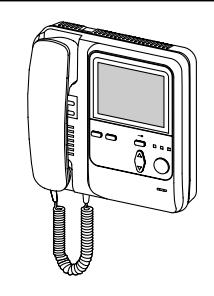
KB-3MRD KB-3HRD
PRECAUTIONS ON INSTALLATION & WIRING
♠ WARNING Negligence could result in death or serious injury.
. CAUTION Negligence could result in injury or damage to property.
The following precautions also apply to KB-3HRD sub station with monitor.

✓!\ CAUTION
- 1. Do not connect any power source other than specified to terminals +, on KB-3MRD. Fire or damage to the unit could result.
- 2. Do not open KB-3MRD. High voltage is present inside, and it can cause electric shock.
- 3. Do not change or alter KB-3MRD. It can cause fire or electric shock.
- 4. Make sure wires are connected properly before plugging in power supply.
- 5. Keep the KB-3MRD unit away from water or any other liquid. Fire or electric shock could result.
- 6. Do not put any forcible strength on the video monitor. Damage may result.
- 7. Keep AC plug away from moisture or dust. (2)
- 8. Keep AC cord away from being marred or crushed. 9. Do not plug or unplug with wet hands.
- 10. Do not put any metal into KB-3MRD through openings. It can cause fire,
- electric shock or unit damage. 1. Do not install or make any wire terminations while power supply is plugged in. \(\infty\) It can cause electrical shock or damage to the unit.
- 2. Do not manually hold down hook switch to verify chime volume. It sounds very (\) loud in the handset, and can cause hearing damage. 3. Mount KB-3MRD on wall in a convenient location, but not where it could be
- bumped or jarred.
-
4. In case of electrical storms, unplug power supply from AC outlet. It can cause fire, electric shock, or power surge damage.
5. Do not install KB-3MRD components in any of the following locations, as it may cause the system to malfunction;
- High or extreme cold temperature area: under direct sunlight, near equipment that varies in temperature, in front of air conditioner, inside a refrigerated area, etc.
- Places subject to moisture or humidity extremes (patinooni, cond., g.con...c.) Places subject to environmental conditions, such as oil, dust, chemicals, salt, etc. Places subject to moisture or humidity extremes (bathroom, cellar, greenhouse, etc.)
- Places subject to constant vibration or illipact. Places where noise generating devices such as TV or radio are close by.
✓ I GENERAL PRECAUTIONS
- 1. KB-3MRD equipment, except for KB-DAR, is designed for indoor use only. Do not install outdoors.
- 2. KB-3MRD system is not operational during a power failure.
- 3. In areas where broadcasting station antennas are close by, intercom system may be affected by radio frequency interference.
- 4. Keep all DC wiring at least 30cm(1') away from AC 100~240V wiring, fluorescent lighting, or dimmer switches. Otherwise, cross AC wiring at a 90° angle.
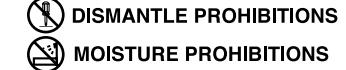
Examples of Symbols ;



- 1 -
SYSTEM OUTLINE & COMPONENTS
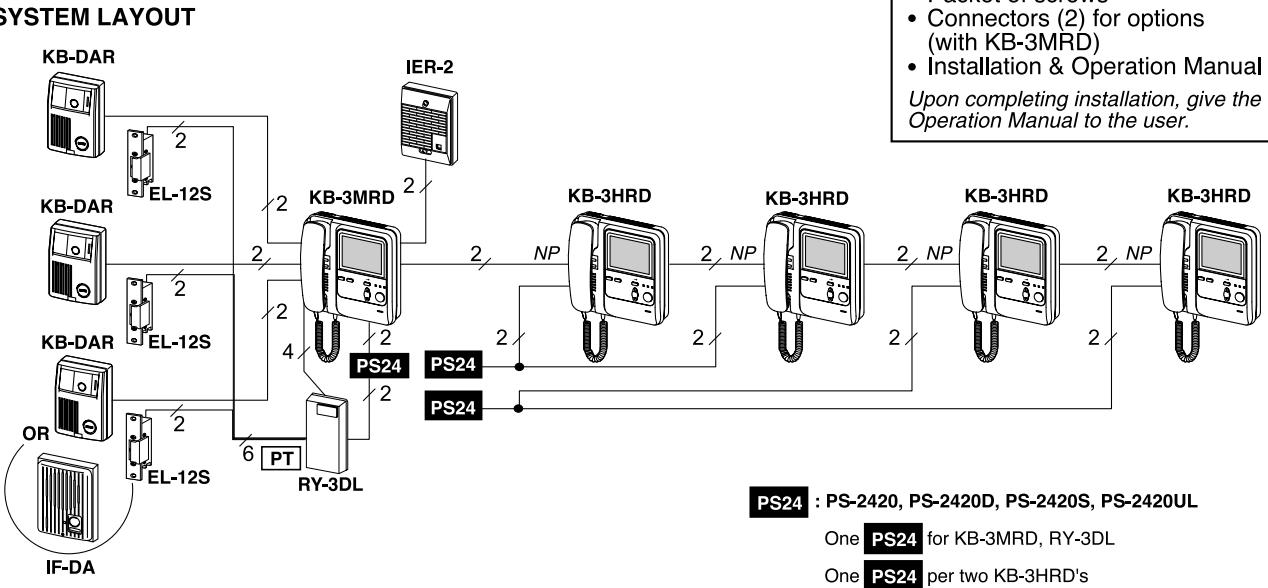
VIDEO SENTRY COLOR TILT 3 - 5: KB-3MRD is an audio video entry security intercom for 3 video doors & max. 5 room stations with monitor.
SYSTEM LAYOUT
SYSTEM COMPONENTS

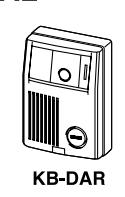
KB-DAR: Video door station. KB-3MRD: Master station w/monitor.
PT : AC transformer PT-1210N in North America
KB-3HRD: Sub station w/monitor (1 4 pcs).
PACKAGE CONTENTS
Packet of screws
Master & sub stations w/monitor (KB-3MRD or KB-3HRD)
KB-3SD: Audio sub station (max. 2). Door station (IE/IF series). IF-DA:
24V DC power supply:
PS-2420, PS-2420D, PS-2420S, PS-2420UL
OPTIONAL COMPONENTS
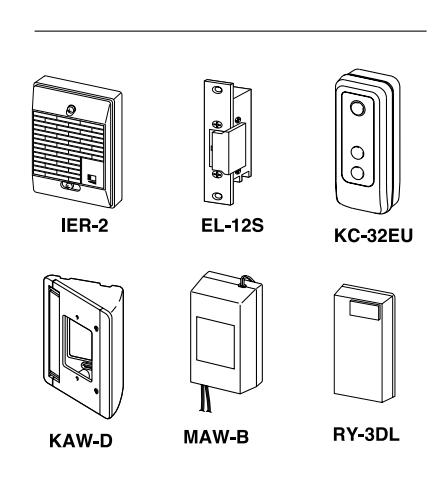
| Model | Description | Functions |
|---|---|---|
| IER-2 | Call extension speaker | One to KB-3MRD master only |
| EL-12S |
Electric door release.
12V AC, 0.125A 12V DC, 0.2A |
Requires an AC transformer (PT-1210N in North America) |
| KC-32EU | Picture memory unit. | Max. 60 image memory. 18V or 24V DC power sourced. |
| MAW-B | Auxiliary light control relay. 24V DC. |
External light turns on when
KB-DAR call button or inside monitor button is pressed. |
| KAW-D | 30° Angle Box for KB-DAR | 1-gang surface mounting. |
|
KA-DGR
PANEL |
Stainless steel panel for KB-DAR | 1-gang surface mounting. |
| RY-3DL | Door release adaptor | 1-gang surface mounting. |
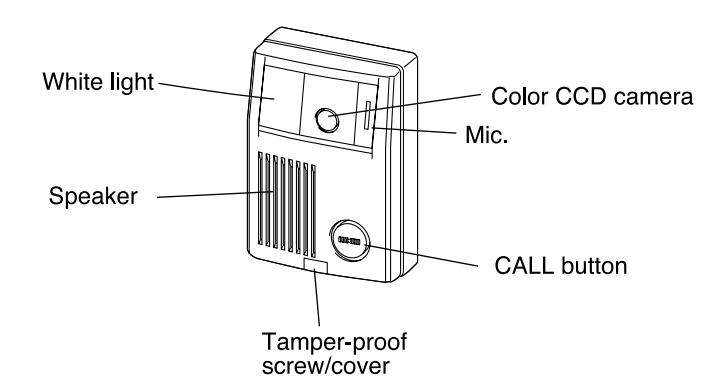
KB-DAR
KB-3MRD
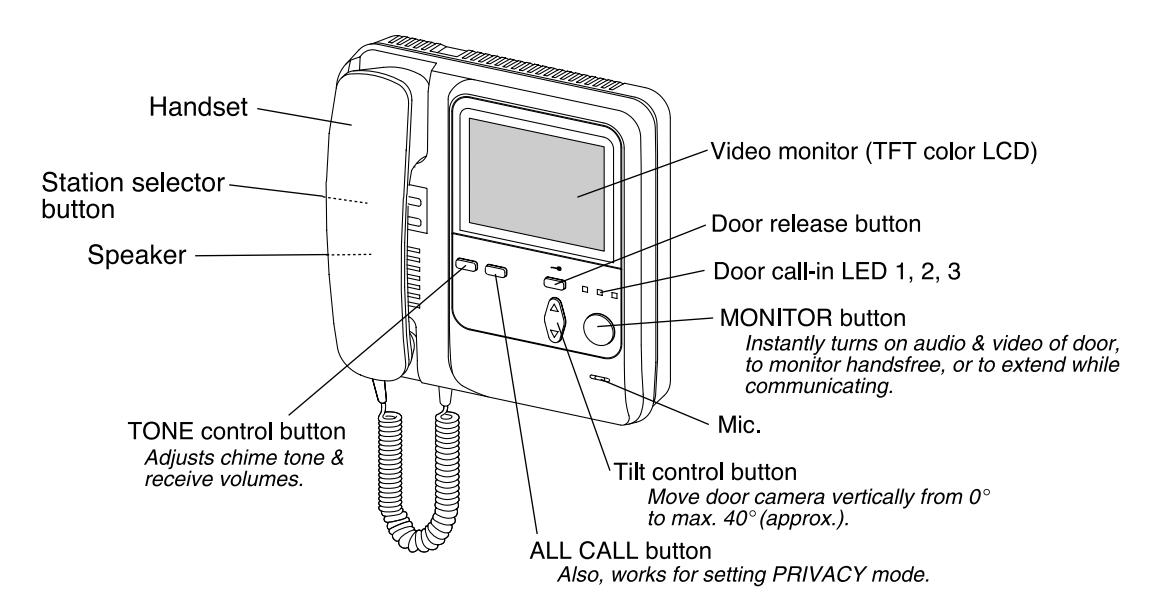

FEATURES
- Audio video entry security intercom 3 doors 5 room stations with monitor with TILT camera control.
- Clear and bright image with TFT(*1) Color LCD monitor and DSP(*2) for door station.
- INSTANT ON audio and video of door station when door calls or during monitoring from room station.
- Selective room calling with handsfree reply at called station.
- ALL CALL button.
- Selective door release control with RY-3DL adaptor.
- Max. 100m distance to farthest sub station w/monitor. See power supply requirements.
(*1) TFT = Thin Film Transistor (*2) DSP = Digital Signal Processor
Cable Specify for wiring to both door and inside stations. 1.0.65mmø to 1.2mmø (22AWG to 16AWG).
2. PE (polyethylene) insulation & Vinyl-sheathed cable. Attenuation of less than – 6.5dB at 10MHz./100m, 330' length.
3. Solid core conductor. (Note: Do not use stranded wire on this system.)
4. Line impedance : (less than at the highest).
For other types, normal operation or max. communication distance cannot be guaranteed.
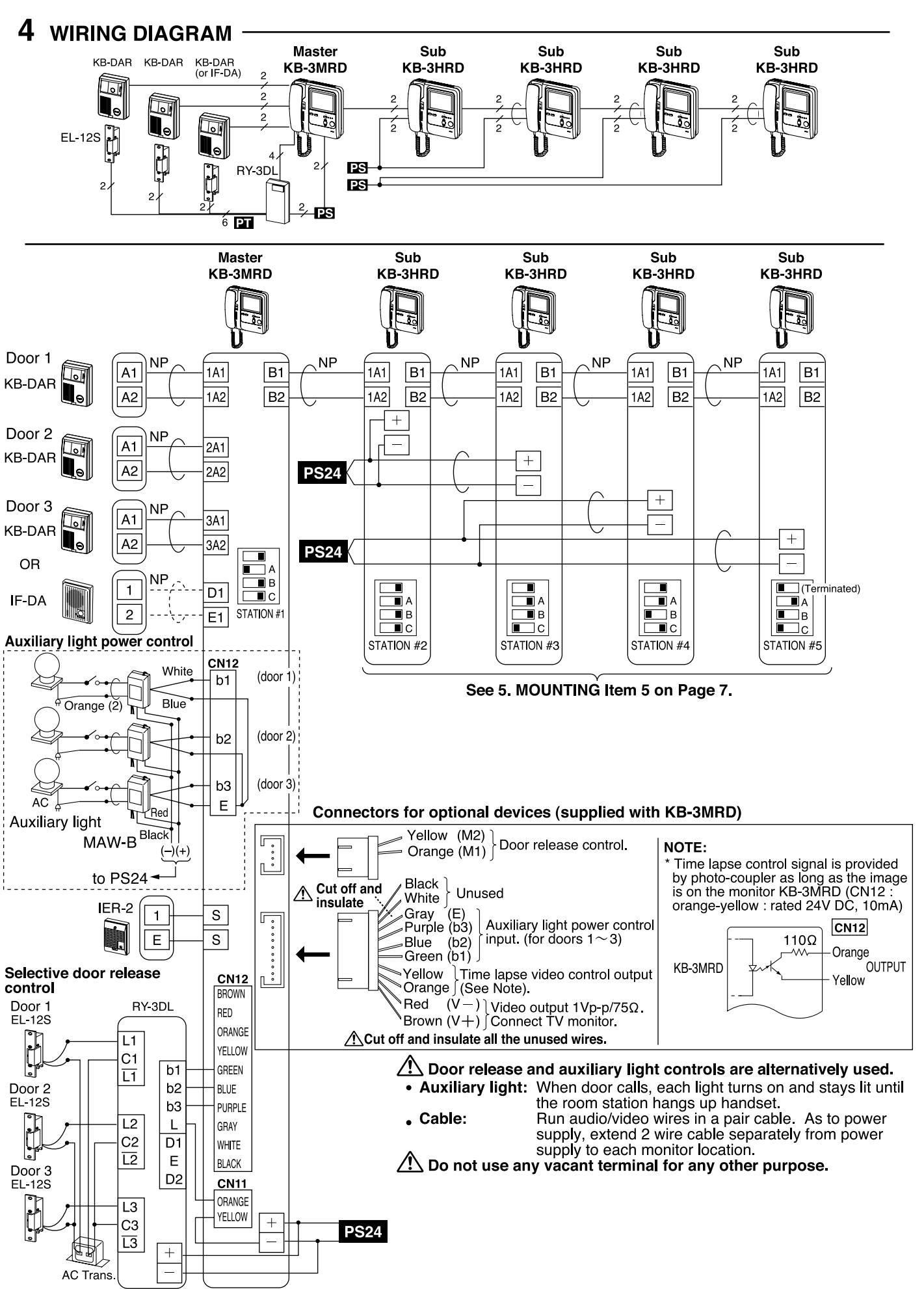
Wiring
- 1. Use a parallel cable to connect video door station. Do not use any other cable like coax-cable, individual wires, etc.
- 2. When existing chime wires are used, be sure to locate and disconnect the AC transformer. When system does not function properly, install new cable as
- 3. If unused wires exist in the cable, terminate each extra pair with a resistor at each end of wires (on audio sub station end as well). Extra wires can interfere with video signal.
- 4. Keep audio/video wires more than 30cm(1') away from AC 100~240V power lines. It will cause noise in communication & malfunction.
- 5. Run internal wiring of audio/video system in such a manner that the cable is run from master to sub without any splices, which will create inferior video quality.
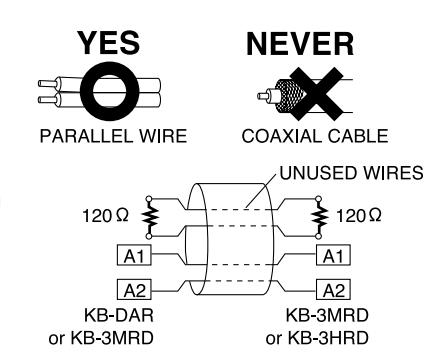
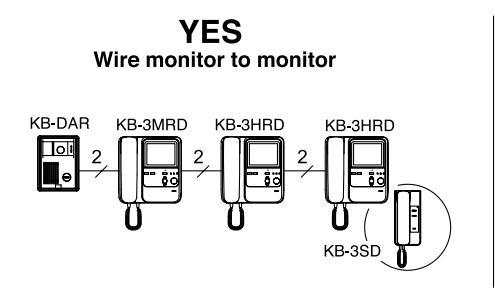

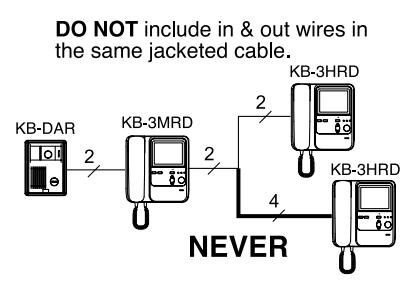
NOTE: The above wiring methods also apply to KB-3SD audio sub station.
Power supply requirements
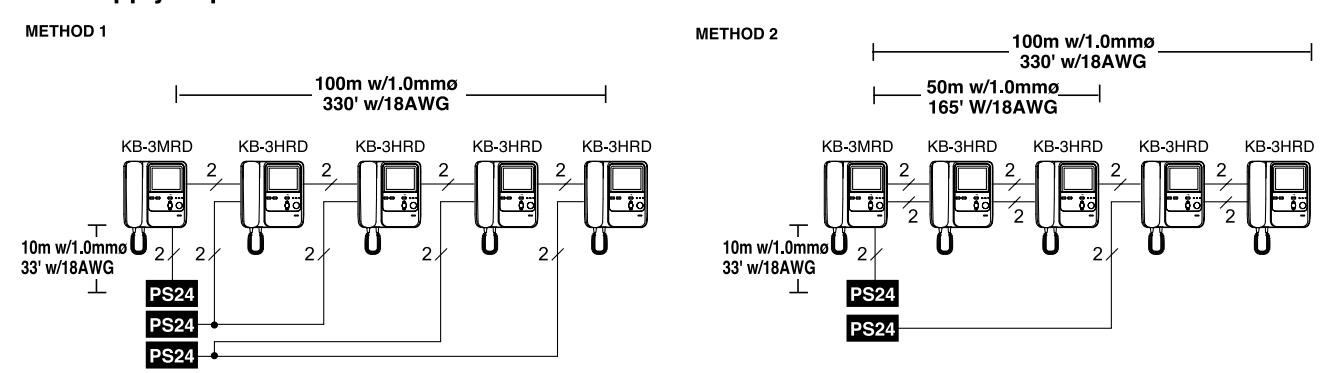
Use a specified power supply to secure proper operations of system.
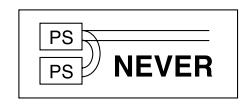
Compatibility
| Description | Compatible | Not compatible |
|---|---|---|
| Video door station | KB-DAR | KC-DAR, KA-DAR, others |
| Sub station w/monitor | KB-3HRD | KC-1HRD |
| Audio sub station | KB-3SD | KC-1SD, IEH-1CD, others |
Mounting locations & Height
Do not install a video door station in the following locations;
- Places subject to temperature/humidity extremes.
- Places from dust, vapor, smoke and chemicals.
- Places where a call is strongly backlit (white wall is on the background).
- Places where direct sunlight or strong light comes into the camera lens.
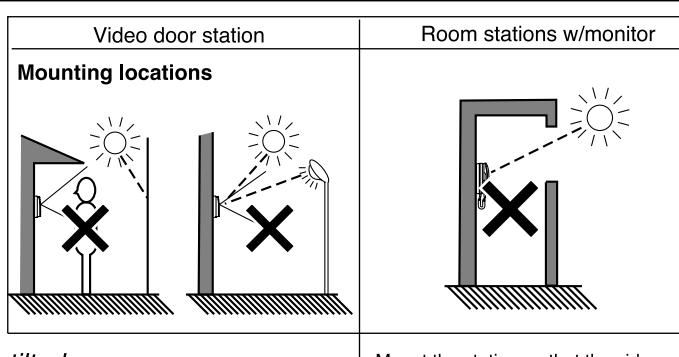
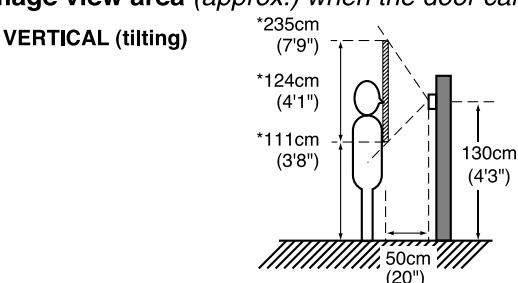
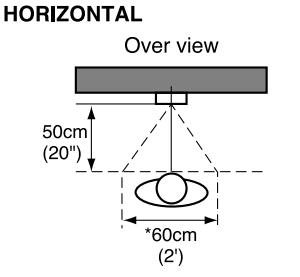
Image view area (approx.) when the door camera is tilted

Setting
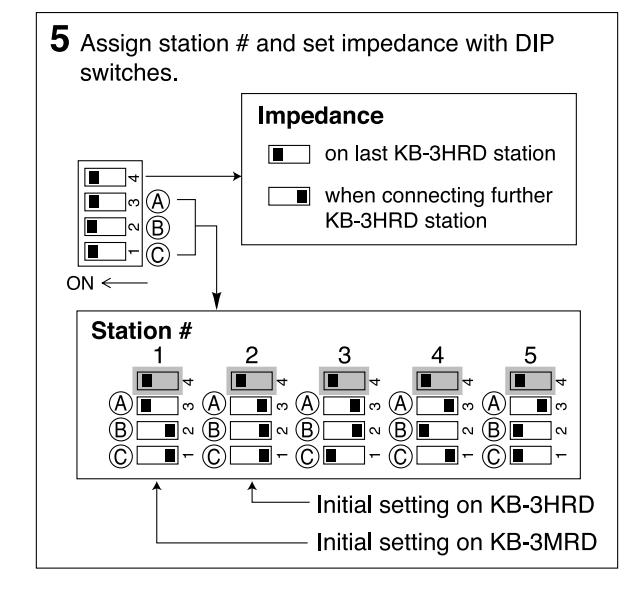
Place the dip switches to put the corresponding function into effect.
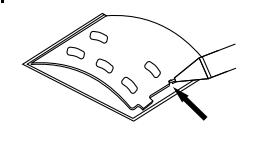
(1) Filling in directory
Open the directory pushing the cut edge. Fill in names with pen.
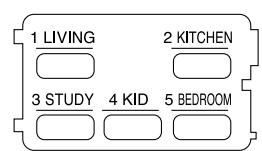
(2) Silencing chime tone
On KB-3MRD & KB-3HRD:

(3) White light on/off
On KB-3MRD only;
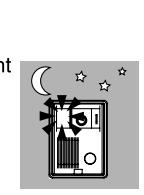
When ambient light is low (during night, etc.), the white light on door station will turn on automatically when door calls or during monitoring.
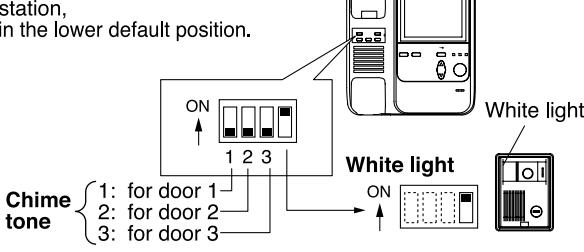
Adjustments
• in standby
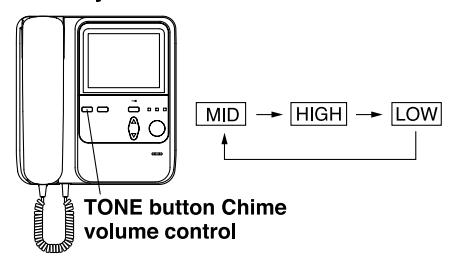
Chime volume
In standby mode, press TONE button. Chime tone sounds at mid level, and changes when the button is pressed. MID (initially set) – HIGH – LOW – MID ...
When power switch is turned off or after power failure, chime volume will return to MID position.
while communicating
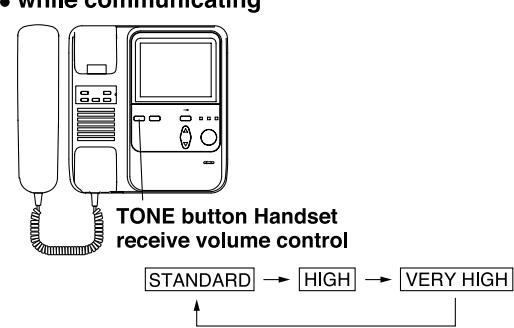
Receive volume
While communicating with door or another room station, press TONE button. Pressing button repeatedly, the recieve volume changes: STANDARD (initially set) - HIGH - VERY HIGH - STANDARD ...
Notes:
- When acoustic feedback takes place in answering door, with receive volume set to HIGH or EXTRA HIGH position, put the volume back to STANDARD position.
- Once receive volume is set, it will be in memory after communication. (When power switch is turned off or after power failed, receive volume will return to STANDARD position)
MOUNTING
KB-3MRD, KB-3HRD
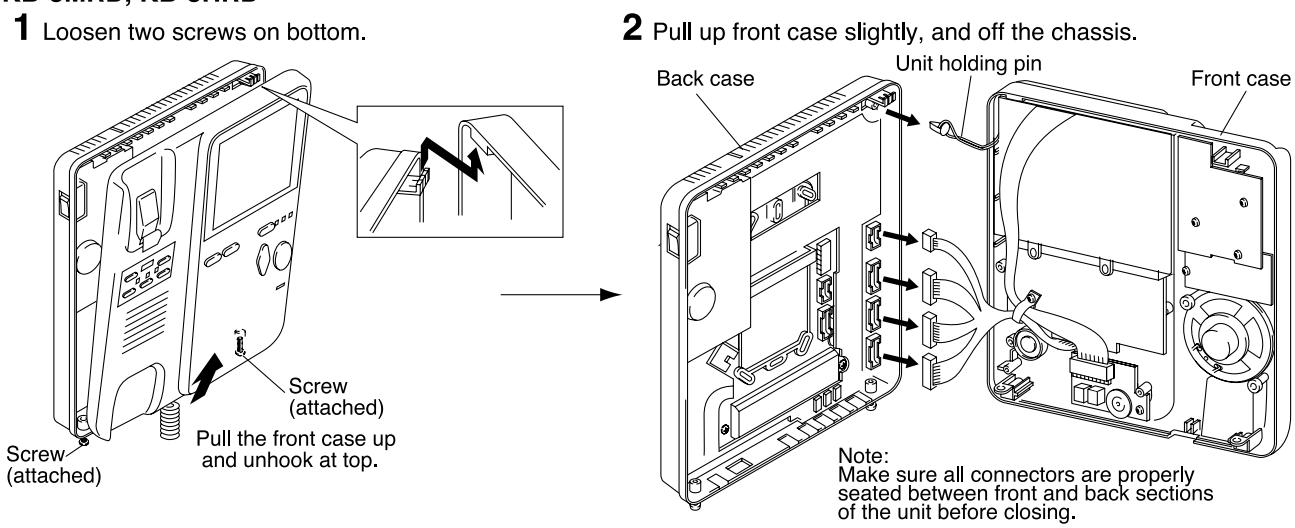
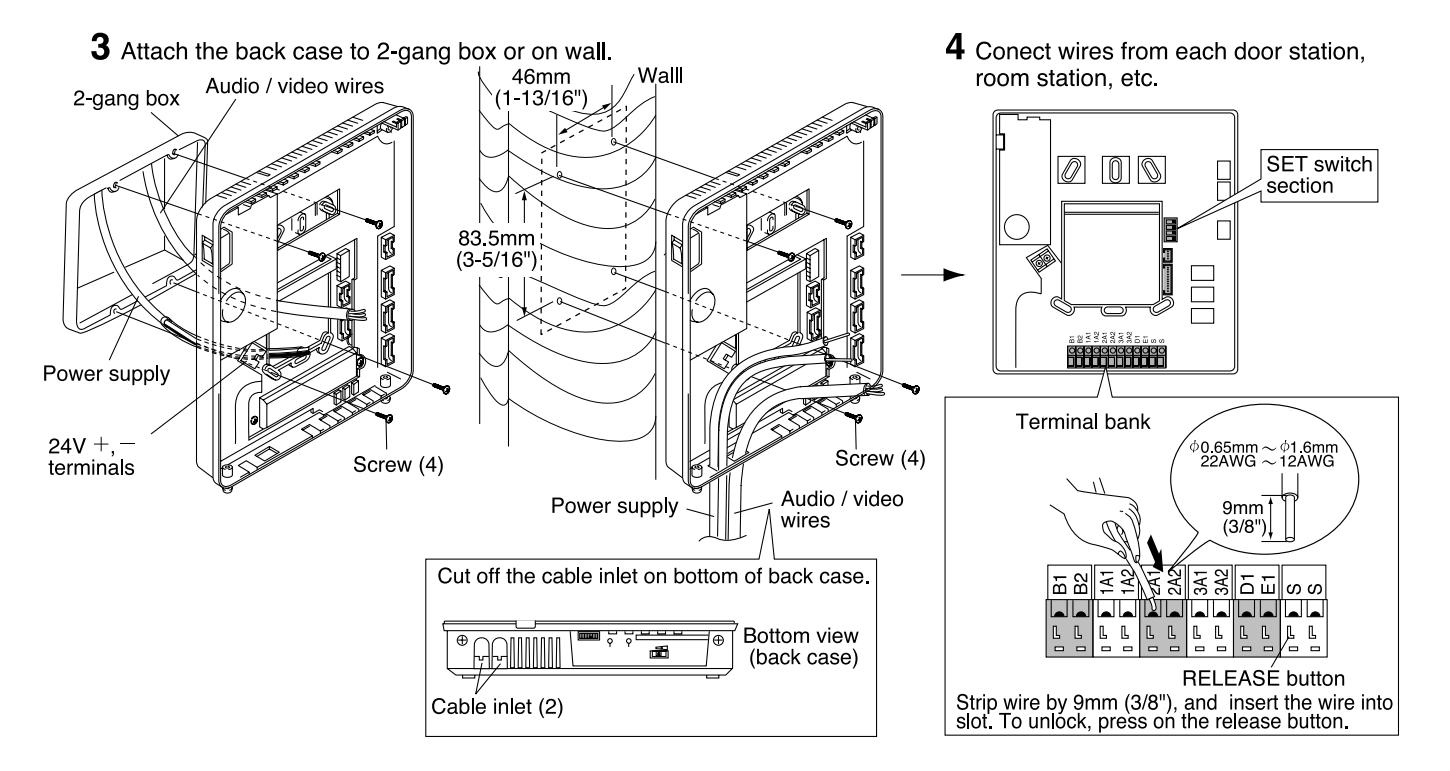
6 Aligning on the hook, put together front case and back case.
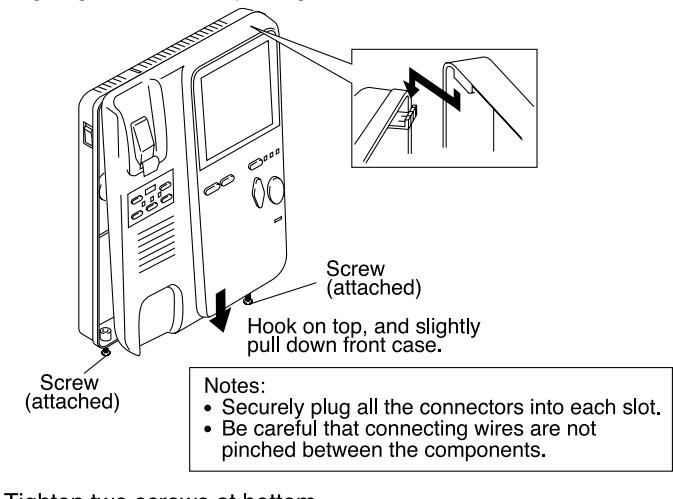
7 Tighten two screws at bottom.
6 TECHNICAL PRECAUTIONS
OPERATING TEMPERATURE
KB-DAR: C C F). KB-3MRD: C ~ C ( F ~ F).
LCD MONITOR
- It must be noted in advance that the TFT color LCD panel, though manufactured with very high precision techniques, inevitably has a very small portion of picture elements that are steadily lit or not lit at all, which is not considered a unit malfunction. The LCD monitor looks dark in the bright sunlit area, etc. Adjust BRIGHT control to high position to increase monitor luminosity, or reduce ambient lighting.
- When holding handset close to video monitor, the image may vary, but this is not a malfunction.
- KB-3MRD unit surface becomes warmer while being powered, but this is not a malfuction.
- Strong light, such as direct sunlight, etc. may cause silhouette on the monitor, but this is not a malfunction.
- When outside temperature lowers sharply after rainfall, etc., the inside of camera may fog up slightly, causing a blurry picture, but this is not a malfunction. Normal operation will be restored when moisture evaporates.
- KB-3MRD may collect dust on the top of the unit. Clean unit as needed.
- Do not apply any caulking sealant around video door station. The openings at the bottom will help rain to dissipate.
CLEANING
Clean KB-3MRD and KB-DAR with a soft cloth dampened with neutral household cleanser. Never use any harsh cleaner or cloth. Do not spray highpressure water on KB-DAR.
AIPHONE CO., LTD., NAGOYA, JAPAN
AIPHONE CORPORATION, BELLEVUE, WA, USA AIPHONE S.A.S., LISSES-EVRY, FRANCE
SPECIFICATIONS (KB-3MRD)
Power source: 24V DC.
Consumption:
| Max. | Standby | |
|---|---|---|
| KB-3MRD: | 710mA | 230mA |
| KB-3HRD: | 260mA | 80mA |
| KB-3SD: | 85mA | 50mA |
· Call-in: 4-, 2- & 8-tone chime from door 1, 2
& 3, with adjustable volume. Pre-tone and voice for internal call,
with adjustable volume.
Simultaneous with handset. Communication:
Handsfree simultaneous at room
station internally called.
• Wiring: 2 solid parallel wires, non-polarized
to door.
2 solid parallel wires, non-polarized
to room.
plus 2 wires to power supply (separately jacketed).
· Wiring distance:
| 0.65mmø | 1.0mmø | |
|---|---|---|
|
100m | 200m |
|
50m | 100m |
|
150m | 360m |
| 22AWG | 18AWG | |
|---|---|---|
| KB-3MRD to door KB-3MRD to farthest monitor/KB-3SD KB-3MRD to door IF-DA |
330'
165' 450' |
660'
330' 1,000' |
For use of cables not specified, normal operation or max. communication distance cannot be guaranteed.
Cable Specify for wiring to both door and inside stations. 1. 0.65mmø to 1.2mmø (22AWG to 16AWG).
2. PE (polyethylene) insulation & Vinyl-sheathed cable.
Attenuation of less than - 6.5dB at 10MHz./100m, 330' length.
3. Solid core conductor.
4. Line impedance : 75 (less than 100 at the highest).
For other types, normal operation or max. communication distance cannot be guaranteed.
• Housing & color: Fire-retardant ABS plastic, in white. Dimensions: 185 (W) x 195 (H) x 84 (D) (mm). 7-1/4"(W) x 7-3/4"(H) x 3-5/16"(D).
Weight: 900g (1.98 lbs.) approx.
AIPHON Providing Peace of Mind