Aiphone LEF-C Series Operations Manual
Open the original PDF document
View PDF

MASTER SENTRY SEMI-FLUSH MOUNT LOUDSPEAKER SYSTEM
Models;
(3-call master)
(5-call master)
(10-call master)
OPERATION MANUAL

NAMES AND FUNCTIONS
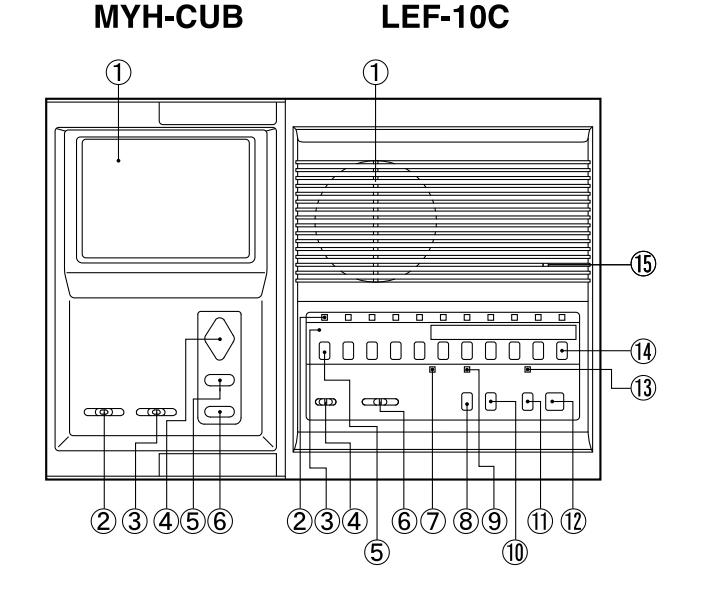
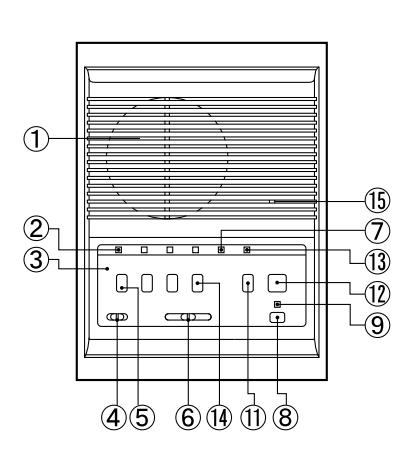
LEF-3C
MYH-CUB
- 1 Video monitor
- 2 Screen brightness switch
- 3 Contrast switch (3-level)
- 4 PanTilt control pad
- ⑤ BACKLIGHT button
- 6 Video monitor button
LEF-10C, LEF-5C, LEF-3C
- (1) Speaker
- ② Sub call-in annunciator LED (also illuminates on master to indicate station selected).
- 3 Directory card & button identification plate
- 4 Music volume control
- (5) Station selector button
- 6 Communication volume control
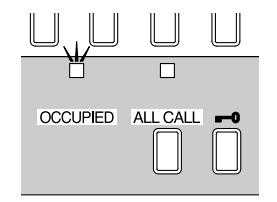
- (7) OCCUPIED LED
- 8 ALL CALL button ALL CALL
- 9 ALL CALL mode indicator LED
- ① Door release button -0 (not included on LEF-3C)
- (1) PRIVACY button

(12) TALK button
(13) Privacy-mode indicator LED
- (14) OFF button OFF
- (15) Microphone (ECM)
NOTE; LEF-5C appearance is the same as LEF-10C, except 5 selector buttons less.
1. AUDIO COMMUNICATION
BEFORE OPERATION, SEE IF OCCUPIED LED IS NOT LIT.
VOLUME ADJUSTMENT
BGM VOL.
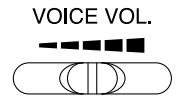
Slide the switch to the right for higher volume. Background music volume can be cut off.
(1) Calling;
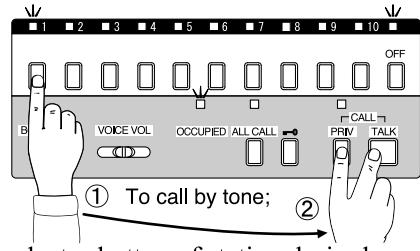
Depress a selector button of station desired.
(call annunciator LED is lit as well as selection indicator LED is lit above OFF button)
<u>To call by tone</u>, depress both PRIVACY and TALK buttons. Call tone sounds while two buttons are being depressed. <u>To call by voice</u>, depress TALK button and speak to the microphone.
Depress TALK button to talk, and release to listen. After communication, depress OFF button.
(4) Receiving a call from door station;
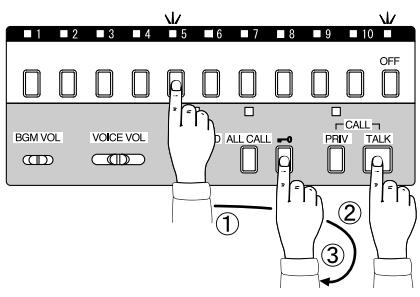
A call is announced by electronic mono tone and LED.
Depress a corresponding selector button.
Depress TALK button to talk, and release to listen.
To activate electric door release, depress and hold ■ ••• button. Depress OFF button for standby.
(2) Receiving a call from other master;
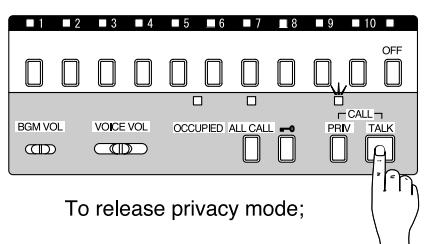
A call is announced by electronic mono tone or voice. Just reply handsfree (or depress TALK button to release privacy mode).
After communication, depress PRIVACY button for standby. Privacy-mode indicator LED is lit when PRIVACY button is in depressed position.
(5) All call
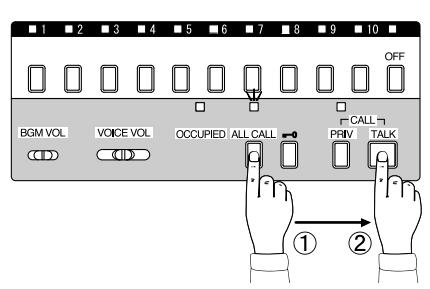
Depress ALL CALL button. The all call mode indicator LED is lit. Depress TALK button while making announcement. After announcement, release ALL CALL button by depressing the button again.
(3) Receiving a call from sub;
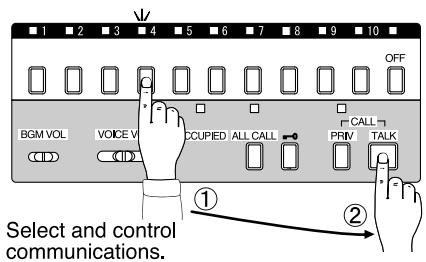
A call is announced by both electronic mono tone and LED. Depress a selector button below the illuminated LED. Depress TALK button to talk, and release to listen. After communication, depress OFF button. The call annunciator LED and selection indicator LED go off.
(6) Monitoring;
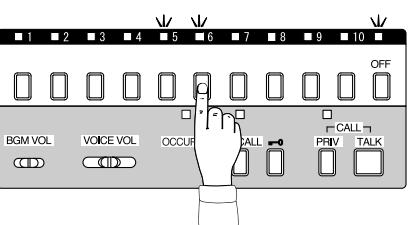
Select a station to be monitored
Depress a selector button of station to be monitored (baby's room, etc.).
If mono tone sounds, it is a call from door or another sub station (No. 5 in the illustration).
Depress a corresponding selector button.
2. VIDEO COMMUNICATION
(1) Receiving a call from video door station;
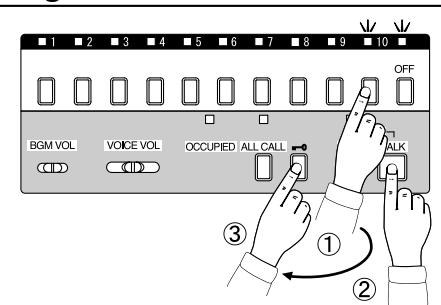
Door station call-in is announced by electronic mono tone and the image of a caller appears on all video monitors. Depress a selector button below the illuminated LED. Depress TALK button to talk and release to listen.
- (1) Reply within 20 seconds after chime tone sounds. Sub call-in annuciator LED goes off in 20 seconds.
- (2) After called, the picture remains for approx. 45 seconds. If picture goes off, depress MONITOR button to have the picture for approx. 2 minutes and half.
- (3) Chime tone is available only when BG-10C is used.
(2) Video monitoring;
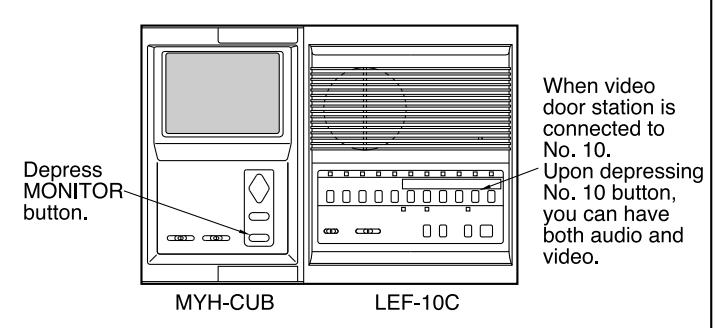
When multiple camera adaptor is used;
Depress MONITOR button on MYH-CUB to turn on door station/camera No.1.
Depress MONITOR button again to have the picture of door station/camera No.2.
If a door station/camera No.3 is installed, depress MONITOR button third time (if not installed, picture goes off).
The fourth pressing MONITOR button turns off the picture. The fifth pressing returns to the No.1 picture.
Notes:
- (1) The picture goes off approximately 2 minutes and half after MONITOR button is pressed. The picture which comes on after last time MONITOR button is pressed, starts from the door station/camera last monitored. If door station calls in after last monitoring, the next video monitoring starts from the door station/camera No.1.
- (2) To monitor the other door station(s); While communicating with one video door station, you can switch to the picture of the next door station, by pressing MONITOR button on MYH-CUB.
- (3) When door station calls in while monitoring, the picture is switched to that of calling door station.
3
SPECIFICATIONS
■ LEF-C;
| * Power source: | DC 12V. Use PS-1225UL or PS-1225S power supply. |
|---|---|
| * Current consumption: | Maximum 300mA per station. |
| * Power output: | Maximum 800mW at 20 ohm (reception). Maximum 500mW at 20 ohm (transmission). |
| * Communication: | Push button station selection. Press-to-talk operation at calling master. Occupied LED illuminates when the system is in use. |
| * Calling: | From master to master/sub; by voice or electronic mono tone. From sub to master; by electronic mono tone and timed LED illumination for max. 20 seconds. Sub's call-in can be signaled by tone even during master is communicating. |
WARRANTY
아는 아는 아는 아는 아는 아는 아는 아는 아는 아는 아는 아는 아는 아
Aiphone warrants its products to be free from defects of material and workmanship under normal use and service for a period of one year after delivery to the ultimate user and will repair free of charge or replace at no charge, should it become defective upon which examination shall disclose to be defective and under warranty. Aiphone reserves unto itself the sole right to make the final decision whether there is a defect in materials and/or workmanship; and whether or not the product is within the warranty. This warranty shall not apply to any Aiphone product which has been subject to misuse, neglect, accident, or to use in violation of instructions furnished, nor extended to units which have been repaired or altered outside of the factory. This warranty does not cover batteries or damage caused by batteries used in connection with the unit. This warranty covers bench repairs only, and any repairs must be made at the shop or place designated in writing by Aiphone. Aiphone will not be responsible for any costs incurred involving on site service calls. Aiphone will not provide compensation for any loss or damage incurred by the breakdown or malfunction of its products during use, or for any consequent inconvenience and losses that may result.
****************

Providing Peace of Mind
http://www.aiphone.com/
AIPHONE CO., LTD., NAGOYA, JAPAN AIPHONE CORPORATION, BELLEVUE, WA, USA AIPHONE S.A.S., LISSES-EVRY, FRANCE Printed in Japan
÷ ÷ ÷ ÷ ÷ ÷ ÷ ÷ ÷ ÷ ÷ ÷ ÷ ÷ ÷ ÷ ÷ ÷ ÷